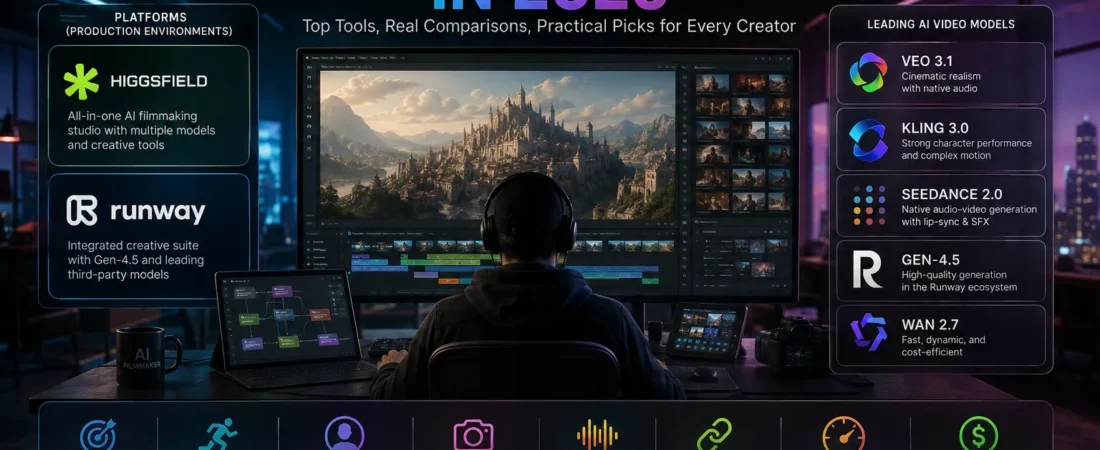
Higgsfield vs Runway vs Kling vs Veo vs Seedance — What Should You Actually Use?
A year ago, choosing an AI video generator was relatively simple.
You picked a website.
Typed a prompt.
Waited.
And hoped the person in the video didn’t suddenly grow a sixth finger.
That world disappeared remarkably quickly.
Today, the difficult part isn’t finding an AI that can generate video.
It’s deciding which one deserves your time—and your credits.
Open one platform and you might see half a dozen different video models.
One produces beautiful cinematic movement.
Another follows complicated prompts more reliably.
Another generates dialogue and sound.
Another keeps a character looking surprisingly consistent.
And another creates a gorgeous ten-second clip that has almost nothing to do with what you asked for.
That’s when I stopped thinking about AI video generation as a single technology.
It’s becoming much closer to choosing cameras and lenses.
There isn’t one “best camera” for every shot.
And increasingly, there isn’t one best AI video model either.
First, Stop Comparing Platforms and Models as If They’re the Same Thing
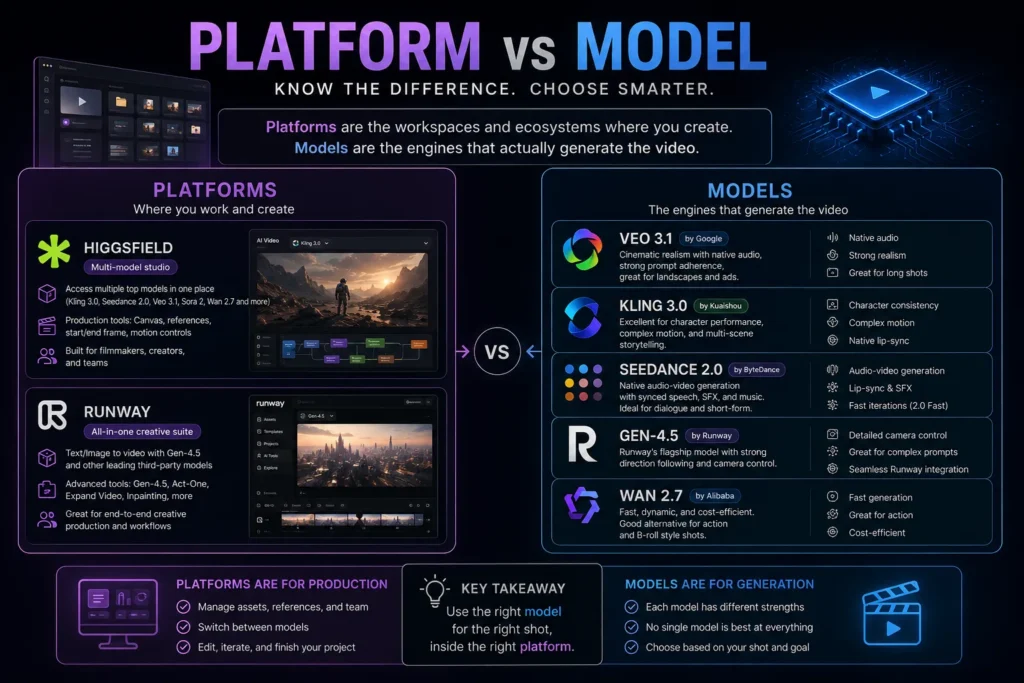
This distinction has become important.
Higgsfield is a platform.
Runway is a platform—and also develops its own models.
Kling is a video-generation model family and product ecosystem.
Veo comes from Google.
Seedance comes from ByteDance.
Yet you’ll increasingly find several of these models inside the same creative platform.
Higgsfield currently advertises access to models including Kling 3.0, Seedance 2.0, Veo 3.1, Sora 2, and Wan 2.7 from one workspace. Runway similarly provides its own Gen-4.5 alongside selected third-party models, including Veo 3.1 and Seedance 2.0.
That changes the buying decision.
You’re no longer simply choosing:
Higgsfield or Runway?
You’re often choosing two things:
Where should I work?
and
Which model should generate this particular shot?
Those are different decisions.
The Test That Matters Isn’t “Can It Make a Beautiful Video?”
Almost all leading video models can now produce an impressive demo.
That’s no longer a useful test.
The better question is:
Can I make the video I intended to make?
There’s a huge difference.
Suppose I want a woman to walk through a crowded 15th-century market, turn toward the camera, say one sentence, notice something happening behind her, and continue walking while the camera follows.
The first generation may look incredible.
But perhaps she stops walking.
Or turns the wrong direction.
Or the crowd disappears.
Or her clothes change.
Or the camera ignores the requested movement.
Or her face looks different halfway through.
That’s where AI video generation becomes real work.
The first beautiful frame is easy to admire.
Continuity is where the technology gets tested.
The Eight Things I Would Actually Compare
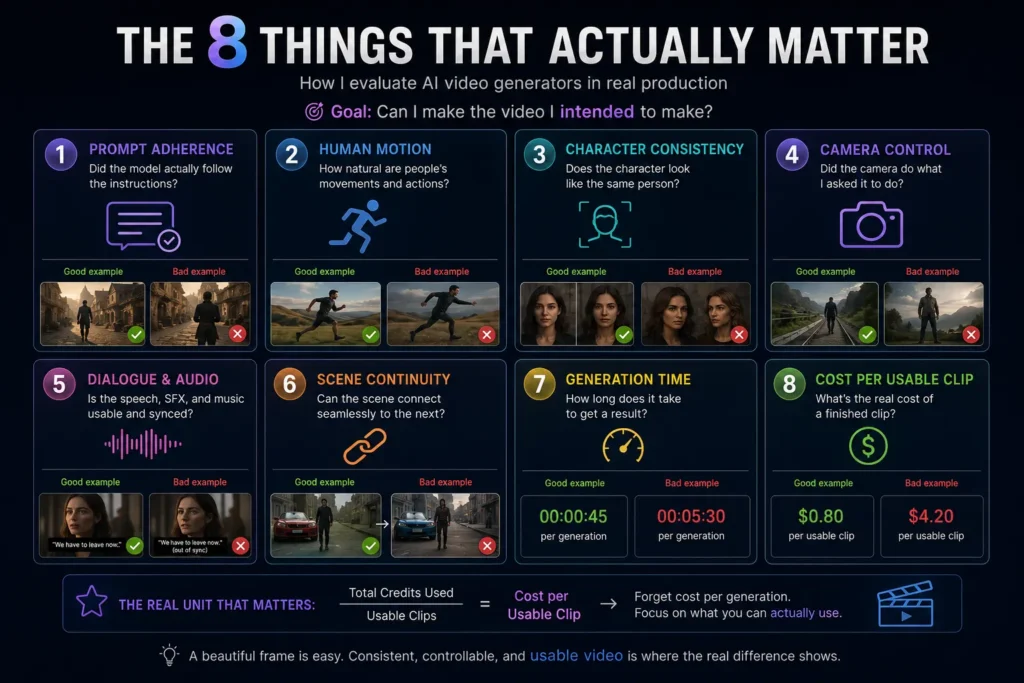
If I were evaluating an AI video generator for real production, I wouldn’t begin with image quality.
I’d score eight things.
1. Prompt Adherence
Did the model actually follow the instructions?
Not approximately.
Actually.
If I ask the camera to move behind the character while she continues walking forward, does that happen?
Complex instructions expose differences between models very quickly.
Runway describes Gen-4.5 as being designed for complex sequential instructions and detailed camera choreography, which is exactly the type of capability that matters once prompts become more ambitious.
2. Human Motion
Walking is surprisingly difficult.
So are hands.
Turning.
Running.
Picking something up.
Interacting with another person.
A cinematic still image that slowly zooms forward can hide many weaknesses.
A person performing several physical actions cannot.
3. Character Consistency
This matters enormously for storytelling.
A ten-second advertisement can tolerate small differences.
A three-minute short film cannot.
If the protagonist appears in twelve clips, viewers notice immediately when:
- the face changes,
- hair changes,
- clothing changes,
- age changes,
- body proportions change.
Character consistency is one of the reasons reference-image and identity-control systems have become so important.
4. Camera Control
AI video becomes much more useful when you’re directing instead of gambling.
Can you control:
- dolly movement,
- orbit,
- tracking,
- handheld motion,
- zoom,
- perspective,
- start and end frames?
Higgsfield has leaned particularly hard into this production-oriented layer, offering features such as start/end-frame control and motion references around the underlying generation models.
5. Dialogue and Audio
This category has changed dramatically.
Video used to be generated first.
Audio came later.
Now models increasingly generate synchronized speech, sound effects, ambience, and other audio directly with the scene.
Seedance 2.0 is currently presented by Higgsfield as a native audio-video model, while Veo 3.1 is also designed around video generation with native audio capabilities.
That can eliminate several steps from an AI filmmaking workflow.
It can also create new failure modes.
A visually excellent scene becomes useless surprisingly quickly when the dialogue timing feels wrong.
6. Scene Continuity
This is different from character consistency.
Imagine:
Clip 1 ends with a woman standing beside a red car.
Clip 2 begins.
The woman is now three meters away.
The car has changed shape.
The street is different.
Technically, both clips are beautiful.
Together, they’re unusable.
The longer the story, the more important the final frame of one generation becomes to the beginning of the next.
7. Generation Time
This gets overlooked in reviews.
If one model produces a slightly better clip but requires significantly more iteration, the “better” model may become the worse production tool.
When you’re making twenty scenes, waiting matters.
So does failure rate.
Which brings us to the metric I think creators should care about much more.
8. Cost per Usable Clip
Forget cost per generation for a moment.
Suppose Model A costs $1 per generation.
Model B costs $2.
Model A requires six attempts before you get something usable.
Model B requires two.
Which model is cheaper?
This is the economics of AI video that pricing tables rarely capture.
The real unit isn’t:
Cost per generation.
It’s:
Cost per clip I’m actually willing to publish.
Higgsfield: The Production Workspace
The most interesting thing about Higgsfield right now isn’t that it has “the best model.”
It doesn’t need to.
Its proposition is increasingly:
Put the models in one production environment and let the creator choose.
As of August 2026, Higgsfield lists major video models such as Kling 3.0, Seedance 2.0, Veo 3.1, Sora 2, and Wan 2.7 in the same workspace, with controls around reference frames, motion, editing, and character-oriented workflows.
That’s a very different proposition from subscribing to a single model.
For someone making:
- AI short films,
- advertisements,
- cinematic social videos,
- character-driven stories,
that flexibility can be extremely attractive.
A dialogue scene might use one model.
An action shot another.
A highly controlled camera movement another.
You stop asking one model to be perfect at everything.
You start directing a collection of models.
That feels much closer to an actual production workflow.
Runway: The Mature Creative Suite
Runway remains interesting for almost the opposite reason.
It has spent years building the environment around generative video.
Its current flagship Gen-4.5 supports text-to-video and image-to-video, with clips from 2 to 10 seconds and detailed prompt control. Runway also offers broader creative tooling, including its Agent and node-based Workflows, while integrating selected third-party models.
That makes Runway less interesting as “a video generator” and more interesting as a creative production environment.
For someone who wants to generate, iterate, organize, transform, and continue working with outputs without constantly jumping between unrelated services, that maturity matters.
This is something benchmark comparisons rarely measure.
The best generation is only one part of making a video.
Veo 3.1: When Realism and Native Audio Matter
Google’s Veo 3.1 has pushed particularly hard on realistic video generation, reference-based consistency, vertical formats, and native audio.
Google has also expanded Veo 3.1 across products including Gemini, Flow, YouTube Shorts, the Gemini API, Vertex AI, and Google Vids.
That breadth matters.
A model that lives inside a wider creative ecosystem can become more useful than an isolated generator—even if another model wins a particular visual comparison.
For cinematic realism, dialogue-driven scenes, and polished advertising-style footage, Veo deserves serious consideration.
But “best-looking” still doesn’t automatically mean “best workflow.”
Seedance 2.0: The Model I’d Watch Closely
Seedance is particularly interesting because it reflects where AI video is moving next.
Not just video.
Audio and video together.
Instead of generating a silent clip and assembling the rest afterward, the goal is increasingly to produce a coherent audiovisual scene in one generation.
Higgsfield currently describes Seedance 2.0 as supporting synchronized lip-sync, sound effects, and music in one pass, and both Higgsfield and Runway expose Seedance 2.0 variants in their current model selections.
For dialogue, performance, and creator workflows, that’s potentially a major advantage.
But native audio doesn’t automatically make a clip usable.
Timing, performance, character consistency, and directorial control still matter.
A model can technically speak and still fail the scene.
Kling 3.0: When Motion Becomes the Test
Kling has become difficult to ignore in AI video.
Higgsfield currently positions Kling 3.0 around photorealism, complex motion, native lip-sync, and multi-scene capabilities.
That’s important because movement is where beautiful AI imagery often collapses.
A face can look perfect.
Then the character turns.
Walks.
Touches something.
Interacts with another person.
Suddenly the illusion breaks.
Models that handle physical performance consistently have an enormous advantage for narrative video.
Not because their screenshots look better.
Because their footage survives movement.
The First Lesson I’d Give Anyone Starting AI Video
Don’t subscribe to five tools.
Not yet.
Choose one environment where you can test several kinds of generation.
Then create a small production test.
Not random prompts.
Make five shots:
- A close-up with subtle facial movement.
- A person walking while the camera tracks them.
- Two people interacting.
- A dialogue scene.
- A scene that must continue from a previous frame.
Those five shots will tell you far more than fifty beautiful demo reels.
Because you’ll immediately discover what matters for your work.
Maybe you don’t need native audio.
Maybe character consistency is everything.
Maybe you make product advertisements and don’t care about long-form continuity.
Maybe you’re building AI films and continuity is the entire game.
There is no universal winner because creators aren’t making the same thing.
The Question Has Changed
A year ago, people asked:
Can AI generate video?
Then:
Which AI generates the best video?
I think we’re moving into a third question:
Which combination of model, controls, and workflow lets me reliably produce the video I imagined?
That’s a much more mature question.
And it’s also where AI filmmaking starts becoming genuinely interesting.
Because the technology is no longer impressive simply because something moves.
The standard is becoming much higher.
Can I direct it?
Can I repeat it?
Can I continue the scene?
Can I keep the actor?
Can I control the camera?
Can I afford enough failed generations to finish the project?
Those are production questions.
And once you start asking them, the leaderboard looks very different.
So Which One Would I Actually Use?
After comparing AI video tools for a while, I’ve become less interested in declaring one universal winner.
The better question is much more practical:
What am I trying to shoot?
A talking character is not the same problem as a landscape.
A product advertisement is not the same problem as a historical short film.
A six-second social clip doesn’t require the same workflow as a three-minute story.
Once you separate those jobs, the choices become much clearer.
If I’m Making an AI Film: I Wouldn’t Use One Model
This is probably the biggest change in how I think about AI filmmaking.
At first, the natural instinct is to choose the strongest model and make the entire film with it.
I don’t think that’s the best approach anymore.
Imagine a 90-second short film.
It contains:
- an establishing shot of a medieval city,
- a close-up of the protagonist,
- two characters talking,
- someone running through a crowd,
- a large environmental shot,
- a quiet emotional ending.
Those are six very different generation problems.
Trying to force one model to dominate every shot is like making a movie with one lens because it scored highest in a camera review.
I’d rather assign models by shot.
For example:
Large cinematic environment
→ Veo 3.1
Character-heavy performance
→ Kling 3.0
Multi-shot audiovisual sequence
→ Seedance 2.0
Fast alternative or dynamic action
→ Wan 2.7
Controlled production and assembly
→ Higgsfield or Runway as the workspace
The exact combination will change as models improve.
The principle probably won’t.
Choose the model after you understand the shot.
Higgsfield vs Runway Is Really a Workflow Decision
This distinction matters enough to repeat.
Higgsfield and Runway are increasingly not comparable to Kling or Veo in a simple four-way contest.
They’re environments in which production happens.
Higgsfield currently puts models including Kling 3.0, Seedance 2.0, Wan 2.7, Veo 3.1 and others inside the same ecosystem. Its Canvas also allows creators to connect prompts, references, image generations and video generations as nodes, route the output of one model into another, reuse workflows, and bring consistent character assets into the pipeline.
Runway follows a similar multi-model direction while retaining its own models. Its current model catalog includes proprietary tools such as Gen-4.5 alongside third-party options, and Runway Agent can select among Gen-4.5, Seedance 2.0, Kling, Veo and other available models depending on the requested task.
So my decision would be less:
Which website generates prettier pixels?
And more:
Which workspace makes it easier for me to finish the whole project?
That includes:
- references,
- revisions,
- model switching,
- failed generations,
- asset management,
- consistency,
- editing,
- collaboration,
- credits.
Generation quality gets you a clip.
Workflow gets you a finished video.
Best for Cinematic Realism: Veo 3.1
If my priority were a visually convincing cinematic scene, Veo 3.1 would be high on my test list.
Google says Veo 3.1 improves audiovisual quality, prompt adherence and realism while expanding audio into workflows such as image-to-video and video extension. Flow can also use multiple reference images through its Ingredients-to-Video workflow to influence characters, objects and visual style.
That makes it especially interesting for:
- environmental shots,
- atmospheric sequences,
- cinematic advertising,
- realistic outdoor scenes,
- scenes where generated sound contributes to immersion.
But I’d still test the exact shot before committing a large number of credits.
Realism in a landscape doesn’t guarantee perfect performance in a close-up conversation.
That’s the recurring lesson of AI video.
Model reputation is not shot performance.
Best for Character Performance: Kling 3.0 Deserves a Test
For character-driven scenes, I’d put Kling 3.0 near the top of the shortlist.
Higgsfield currently describes it around photorealism and complex motion, while its current text-to-video implementation highlights multi-scene storyboarding, character performance and native lip-sync capabilities.
That’s particularly relevant for:
- dialogue,
- people walking,
- emotional reactions,
- short narrative scenes,
- repeated characters,
- physical interaction.
Why do I care so much about movement?
Because character consistency isn’t just keeping the same face.
A character also needs to feel like the same physical person.
How they move.
Where they’re standing.
What they’re holding.
Which direction they’re facing.
AI storytelling falls apart when those details reset between shots.
Best for Audio-First Generation: Seedance 2.0 Is One to Watch
Seedance 2.0 is particularly interesting because the current generation of AI video is moving beyond silent visual generation.
Higgsfield currently presents Seedance 2.0 as a native audio-video model capable of producing synchronized lip-sync, sound effects and music in the generation, while its current Unlimited offering includes Seedance 2.0, Fast and Mini variants.
That’s potentially valuable for:
- dialogue scenes,
- short advertisements,
- social content,
- music-driven clips,
- scenes where sound and action need to feel connected.
The practical advantage is obvious.
A workflow that previously required:
video generation
→ voice generation
→ lip sync
→ sound effects
→ music
→ editing
can potentially collapse several steps.
But I wouldn’t evaluate it by checking whether audio exists.
I’d evaluate whether the audio is usable.
Does the voice fit the character?
Does speech begin at the right moment?
Does the character stop speaking when they should?
Does ambient sound match the scene?
Does music interfere with dialogue?
Native audio removes steps only when the generated audio is good enough to keep.
Where Gen-4.5 Fits
Runway’s own Gen-4.5 remains important because it is built around Runway’s native creative environment rather than appearing only as another licensed model.
For a creator already using Runway’s broader workflow, that matters.
You can generate a shot and continue working inside the same ecosystem rather than treating generation as an isolated transaction.
This is the part of AI video comparisons I think will matter increasingly over time.
Models will leapfrog each other.
Today’s winner may be third place six months later.
A good workflow survives model changes.
That’s why I wouldn’t choose a platform solely because one model currently looks strongest.
I’d ask whether the platform makes it easy to replace that model when something better arrives.
What I Would Use for YouTube Shorts
Short-form content changes the priorities.
For a 15- to 30-second Short, I care less about maintaining a character across twenty scenes.
I care more about:
- immediate visual impact,
- fast iteration,
- vertical output,
- motion,
- generation speed,
- cost.
A creator producing several Shorts per week may benefit more from a fast model with an acceptable success rate than from the most cinematic model available.
This is where testing cheaper or faster variants becomes valuable.
Don’t spend premium-model credits perfecting a two-second transition nobody will remember.
Spend them on the shot viewers will remember.
What I Would Use for AI Advertising
Advertising introduces another priority:
control.
A beautiful product shot is useless if:
- the logo changes,
- the product shape changes,
- the packaging text mutates,
- the color is wrong,
- the bottle suddenly gains a different cap.
For advertising, I would prioritize reference control and product consistency before cinematic spectacle.
A workflow may therefore begin with a carefully controlled product image, then animate that asset rather than asking text-to-video to invent the product from scratch.
This is also where multi-model platforms become useful.
One model can create or edit the source image.
Another can animate it.
Another can handle a human performance.
The final advertisement may contain footage from several models even though the viewer experiences it as one video.
What I Would Use for a Talking Character
Talking characters are brutal tests.
You need:
- facial consistency,
- believable mouth movement,
- appropriate expression,
- body motion,
- stable clothing,
- usable voice,
- correct timing.
If any one of those fails, the viewer notices.
For this category, I would test Kling 3.0 and Seedance 2.0 early, while also testing Veo 3.1 for the particular visual style and audiovisual scene required.
But I wouldn’t decide based on one generation.
Generate the same short performance several times.
Then calculate something more useful:
How many generations produced a clip I’d actually publish?
That number matters.
The Metric I Wish Every AI Video Review Included
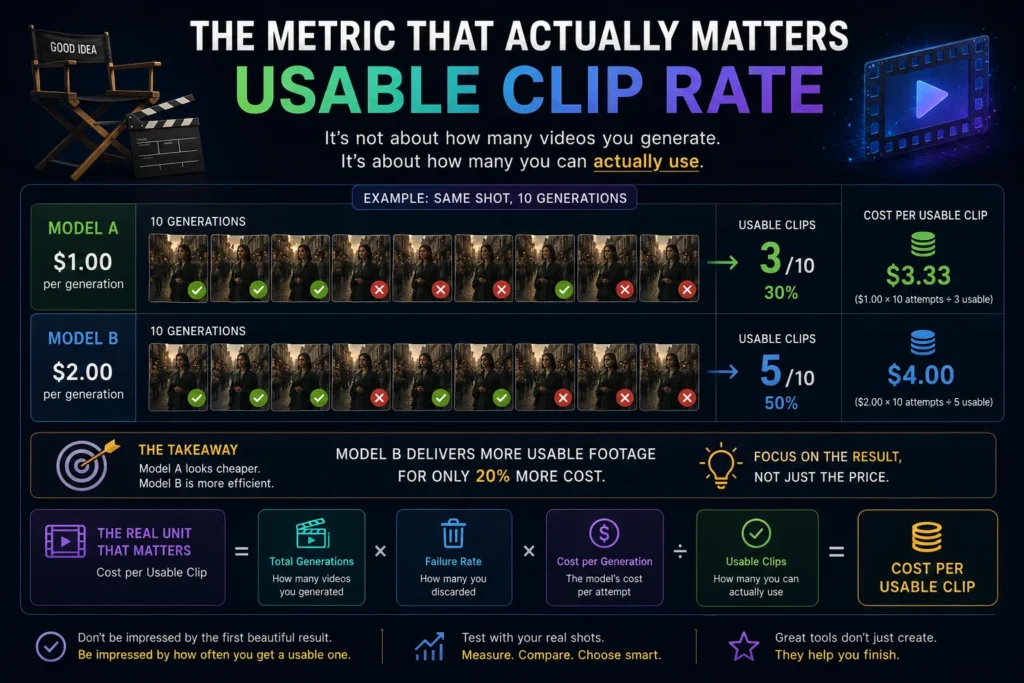
Let’s call it the Usable Clip Rate.
Suppose you generate the same type of shot ten times.
Model A:
8 beautiful clips
3 actually follow the direction well enough to use.
Model B:
6 beautiful clips
5 are usable.
Which model is better?
For Instagram browsing, perhaps A.
For production, probably B.
This is why screenshots and curated demo reels can be misleading.
AI filmmaking is probabilistic.
The question isn’t whether a model can produce an extraordinary clip.
The question is:
How reliably can I get one?
A Simple Production Scorecard
If I were running my own comparison, I’d score every generation from 1 to 5 on:
Prompt Accuracy
Did it do what I requested?
Visual Quality
Would I publish the footage?
Character Consistency
Did the person remain believable?
Motion
Did physical movement look natural?
Camera
Did the requested camera direction happen?
Audio
Was speech and sound usable?
Continuity
Could this clip connect to the previous shot?
Iterations
How many attempts did I need?
Cost
How many credits did the usable result consume?
That final score would tell me far more than:
Model X looks amazing.
Beginner? Start With the Workflow, Not the Model
If you’ve never generated AI video before, don’t begin by subscribing to every major service.
You’ll spend more time comparing dashboards than making anything.
Pick one capable workspace.
Make one thirty-second project.
Learn:
- prompting,
- reference images,
- image-to-video,
- camera direction,
- clip continuation,
- audio,
- editing.
Finish the video.
Then ask what prevented it from becoming better.
If the answer is:
My dialogue scenes are weak.
Find the strongest tool for dialogue.
If it’s:
My characters keep changing.
Solve consistency.
If it’s:
Everything looks good but my credits disappear too quickly.
Optimize cost.
Your second subscription should solve a problem your first project revealed.
Not a problem a YouTube reviewer told you that you have.
Budget Creator? Optimize Failures Before Quality
This sounds backwards, but I’d rather have a slightly less impressive model that succeeds consistently than an expensive model that forces me to regenerate every shot six times.
Before paying for a higher tier, measure:
- average attempts per usable clip,
- credits per attempt,
- percentage of generations discarded,
- total cost of the finished minute.
AI video pricing becomes much easier to understand when you stop counting generations and start counting finished footage.
A cheap failed generation isn’t cheap.
It’s waste.
My Practical Picks by Use Case
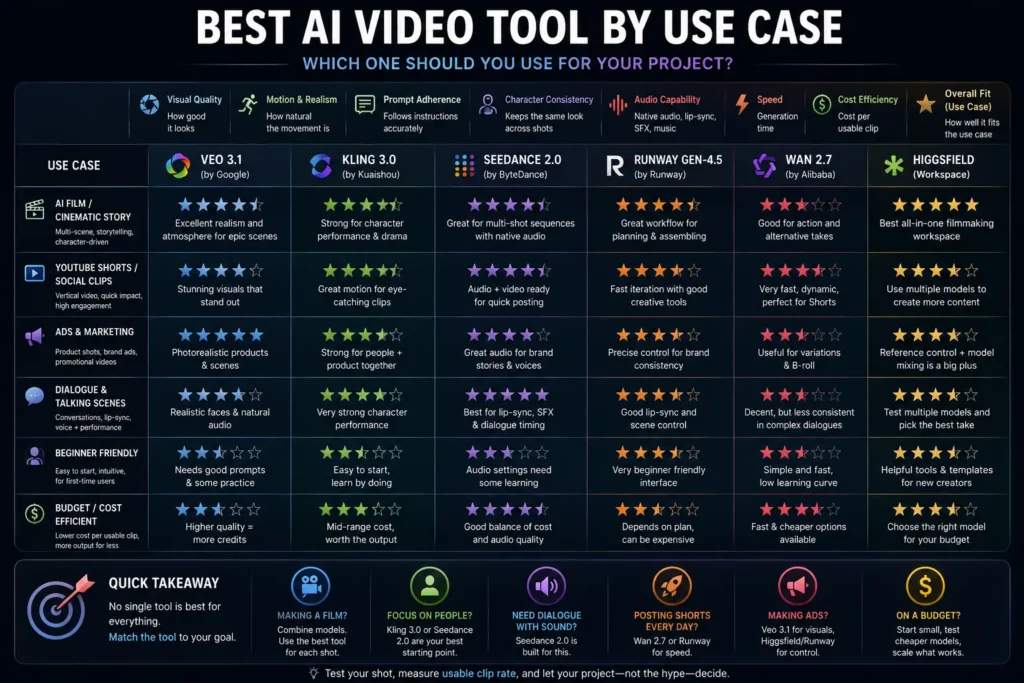
I wouldn’t treat these as permanent rankings. AI video changes too quickly for that.
Think of them as where I would start testing today.
Cinematic environments and audiovisual realism
→ Veo 3.1
Character-heavy narrative and performance
→ Kling 3.0
Native audiovisual generation and multi-shot experimentation
→ Seedance 2.0
Dynamic motion and alternative iterations
→ Wan 2.7
Multi-model filmmaking workflow
→ Higgsfield
Integrated creative production with strong native tooling
→ Runway
And for serious projects?
Use more than one model.
That’s increasingly the answer.
What I Would Not Do
I wouldn’t buy an annual subscription because one viral clip impressed me.
I wouldn’t assume a model is best because its benchmark score is highest.
I wouldn’t begin a long film before testing character continuity.
I wouldn’t generate twenty scenes before deciding how those scenes will connect.
I wouldn’t let AI choose every camera movement.
And I definitely wouldn’t calculate project cost from the advertised price per generation.
Test first.
Build second.
Scale third.
The AI Video Workflow I Think Will Win
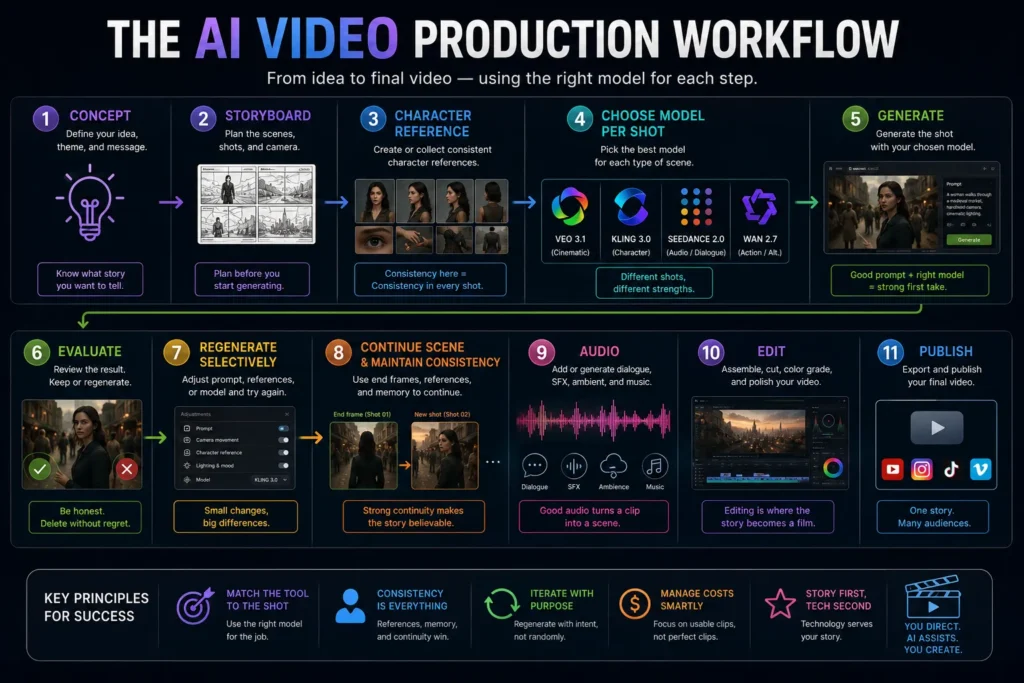
The future of AI filmmaking probably won’t look like this:
Prompt → Video → Done.
It will look more like:
Concept
→ Storyboard
→ Character Reference
→ Scene Design
→ Choose Model per Shot
→ Generate
→ Evaluate
→ Regenerate Selectively
→ Continue Scene
→ Audio
→ Edit
→ Upscale
→ Publish
AI generation becomes one department inside the production process.
That’s why understanding how AI workflows are designed becomes increasingly important once a project moves beyond individual prompts.
Not the entire production process.
That’s an important distinction.
Because once everyone can generate beautiful video, beautiful video stops being the competitive advantage.
Direction becomes the advantage.
Story becomes the advantage.
The same principle applies beyond filmmaking: the most valuable AI workflows automate execution without giving up human judgment.
Taste becomes the advantage.
Knowing which generation to delete becomes the advantage.
Final Thoughts
The most exciting thing about AI video in 2026 isn’t that the models are getting better.
Of course they’re getting better.
What’s more interesting is that creators are beginning to gain choices.
One model for performance.
Another for scale.
Another for audio.
Another for motion.
A platform that ties them together.
That changes the creator’s role.
You’re no longer just writing prompts.
You’re casting models.
Directing shots.
Choosing takes.
Managing continuity.
Controlling a budget.
Making editorial decisions.
In other words, AI video is beginning to look less like pressing a magic button and more like filmmaking.
I think that’s healthy.
Because the magic-button version of AI creativity was never particularly interesting.
If everyone types a sentence and accepts the first result, the technology becomes impressive while the work becomes forgettable.
The interesting work begins when someone looks at ten technically excellent generations and says:
Not that one. This one.
That’s taste.
And AI still doesn’t remove the need for it.
So if you’re trying to choose the best AI video generator in 2026, don’t ask which model makes the prettiest demo.
Ask something harder:
Which setup lets me direct the scene I actually imagined—and finish the project without losing control of the character, the story, or the budget?
That’s the tool worth paying for.
Frequently Asked Questions
What is the best AI video generator in 2026?
There isn’t one universal winner. Veo 3.1, Kling 3.0, Seedance 2.0 and other leading models have different strengths, while platforms such as Higgsfield and Runway provide broader production environments. The right choice depends on the type of video you’re producing.
Is Higgsfield an AI video model?
Not in the same sense as Kling 3.0 or Veo 3.1. Higgsfield is a creative platform that provides access to multiple video and image models plus production-oriented tools and workflows. Its current AI Video environment lists Seedance 2.0, Kling 3.0, Wan 2.7, Veo 3.1 and other models.
Does Runway only use Runway models?
No. Runway provides its own proprietary models as well as selected third-party models. Its documentation says subscribers can access third-party models alongside Runway’s native tools, and Runway Agent can select among models such as Gen-4.5, Seedance 2.0, Kling and Veo depending on the task and account availability.
Which AI video model is best for native audio?
Seedance 2.0 and Veo 3.1 are among the models worth testing when native audiovisual generation matters. Higgsfield describes Seedance 2.0 around synchronized lip-sync, effects and music, while Google says Veo 3.1 expands generated audio across several Flow video-generation capabilities.
Should beginners subscribe to several AI video platforms?
Probably not. Start with one capable environment, finish a small project, identify the specific limitation you encounter, and only then add another tool or subscription.
What matters most when comparing AI video generators?
For real production, evaluate prompt adherence, human motion, character consistency, camera control, audio, scene continuity, generation time, failure rate and cost per usable clip—not visual quality alone.