I Didn’t Need Another AI Tool. I Needed a Better Way to Work.
For a while, I believed I had a productivity problem.
Every week I discovered a new AI tool that promised to save time. I subscribed to some of them, bookmarked dozens more, and watched countless YouTube videos explaining how they would transform the way I worked.
On paper, I should have been getting more done than ever.
But something strange happened.
By the end of most days, I still felt busy.
Not the satisfying kind of busy that comes from solving difficult problems.
The exhausting kind.
The kind where you’ve answered emails, attended meetings, updated documents, replied to messages, searched through PDFs, and somehow reached 6 p.m. wondering what you actually accomplished.
That feeling stayed with me longer than I expected.
Because AI was helping.
It just wasn’t changing my day.
One afternoon, while preparing a proposal, I noticed something that had become completely normal.
An email arrived.
I copied part of it into ChatGPT.
I copied the answer back into Outlook.
Then I opened another browser tab to summarize a PDF.
I pasted those notes into Notion.
A few minutes later I created a task in my project board based on those notes.
Nothing about that process felt difficult.
But when I stopped for a moment, I realized I had spent nearly half an hour moving information from one place to another.
AI had written the words.
I had done everything else.
That was the moment I stopped asking,
“Which AI tool should I try next?”
Instead, I started asking a much more uncomfortable question.
Why am I still the one connecting everything?
The Problem Was Never the Writing
Most conversations about AI focus on what it can create.
It can write.
It can summarize.
It can translate.
It can generate images.
Those are impressive capabilities.
But after months of using AI almost every day, I noticed something unexpected.
Writing wasn’t where I was losing most of my time.
Switching was.
Switching from email to documents.
From documents to meetings.
From meetings to task managers.
From task managers back to email.
Each interruption only lasted a minute or two.
But together they quietly fragmented the day.
The work itself wasn’t difficult.
The constant restarting was.
I don’t think enough people talk about that.
Because context switching is hard to measure.
You won’t find it in your calendar.
You won’t see it in a productivity report.
You only notice it when the day ends and it feels like you’ve been moving constantly without making meaningful progress.
The Day I Stopped Collecting AI Tools
There was a period when I genuinely believed the next AI application would solve everything.
A better writing assistant.
A smarter meeting app.
A faster search tool.
A new automation platform.
My browser bookmarks grew every week.
So did my list of subscriptions.
Looking back, I wasn’t building a better workflow.
I was building a bigger toolbox.
And those aren’t the same thing.
Owning more tools doesn’t automatically make work easier.
A workshop filled with expensive equipment is still inefficient if every project requires walking back and forth between every table.
Digital work is no different.
Eventually I realized I wasn’t suffering from a shortage of AI.
I was suffering from a shortage of systems.
That realization changed the way I approached almost every task.
Automation Starts with a Question, Not Software
People often ask which automation platform they should learn first.
Zapier.
Make.
n8n.
Something else.
I understand the question.
I asked it myself.
But I’ve come to think it’s the wrong place to begin.
Before choosing any software, I now ask a much simpler question.
“What is the one task I repeated three or more times today?”
That’s usually where the opportunity is hiding.
Not in the complicated project you’ve been avoiding for months.
In the small routine you’ve stopped noticing.
The follow-up email you write every afternoon.
The meeting notes you organize every morning.
The document you rename five times a week.
The spreadsheet you update every Friday.
Those tasks rarely feel important.
Which is exactly why they continue stealing time.
A Small Experiment That Changed My Thinking
Instead of trying to automate my entire job, I picked one routine.
Meeting notes.
Nothing glamorous.
After each meeting, I always did the same thing.
Read through my notes.
Rewrite them so they made sense.
Highlight action items.
Assign owners.
Copy everything into my project workspace.
It wasn’t difficult.
It was simply repetitive.
So I redesigned only that process.
AI summarized the discussion.
The action items were extracted automatically.
The notes were formatted consistently.
The project page was already waiting for me.
The first time it worked, I didn’t save hours.
I saved maybe ten minutes.
Honestly, it didn’t feel revolutionary.
But then it happened again the next day.
And again the day after that.
A week later, I wasn’t thinking about meeting notes anymore.
They had quietly stopped demanding my attention.
That’s when I understood something that no product demo had ever explained.
The value of automation isn’t in the minutes you save once.
It’s in the mental energy you never have to spend again.
What I’m Really Automating
People sometimes assume automation is about doing less work.
That hasn’t been my experience.
I’m still making decisions.
Still reviewing documents.
Still talking to people.
Still solving problems.
The difference is that I’ve stopped spending so much energy preparing to do those things.
Preparation is invisible work.
It’s the copying.
The formatting.
The renaming.
The organizing.
The searching.
Individually, none of it seems significant.
Collectively, it fills entire afternoons.
That’s what I want AI to handle.
Not the thinking.
Everything that gets in the way of thinking.
The first automation that genuinely changed the way I worked wasn’t complicated.
It wasn’t an AI agent.
It wasn’t a chain of twenty connected apps.
It didn’t require a developer.
It simply removed one decision I had been making over and over again.
Looking back, that’s the pattern I see in almost every successful automation.
They don’t feel revolutionary on day one.
They quietly remove friction until you stop noticing the work you no longer have to do.
That’s when you realize something has changed.
A Workday, Before and After
If someone had watched me work a year ago, they probably wouldn’t have noticed anything unusual.
I looked busy.
Emails were answered.
Meetings were attended.
Documents were delivered.
Deadlines were met.
From the outside, everything appeared efficient.
What they couldn’t see was how often my attention was being reset.
I’d open a proposal.
Pause to answer an email.
Jump into Teams for a quick question.
Search for an attachment.
Open a PDF.
Copy a paragraph into another document.
Return to the proposal.
Read the same page again because I’d forgotten where I was.
That wasn’t work.
It was recovery.
Every interruption forced my brain to rebuild context.
Not once.
Dozens of times.
Today, the day looks different.
Not because I work fewer hours.
Because fewer things ask for my attention.
The Workflow I Actually Depend On
People often ask me what my “AI workflow” looks like.
They’re usually expecting something complicated.
The reality is surprisingly ordinary.
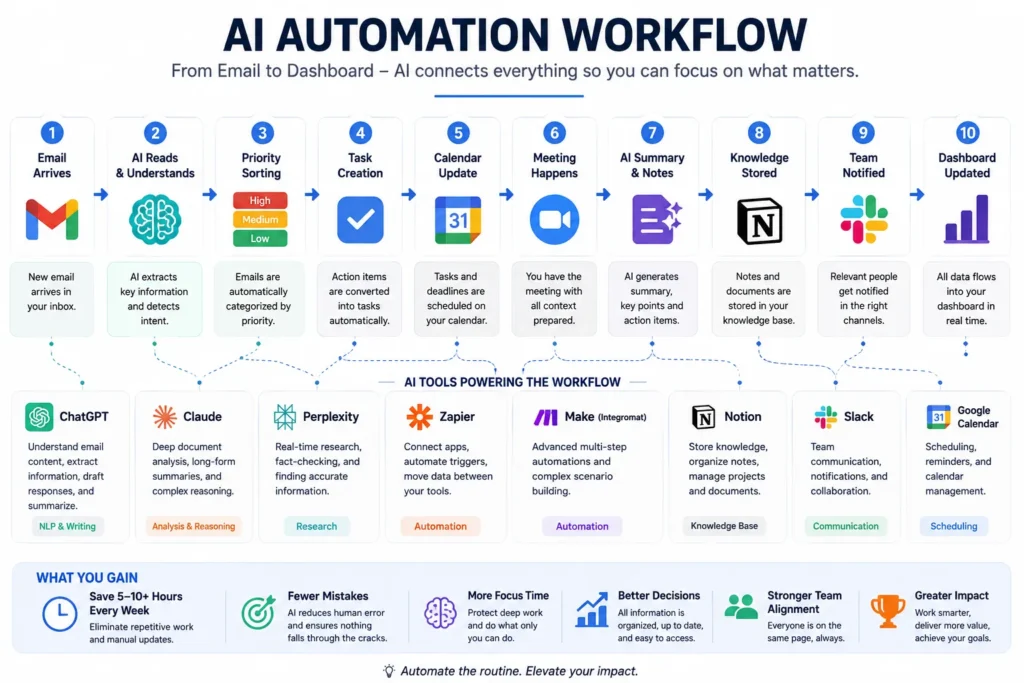
It starts with email.
When messages arrive, I don’t rush to answer them.
Instead, they’re sorted into three simple categories.
Needs a decision.
Needs information.
Can wait.
That sounds almost too simple to matter.
Until you realize how much energy disappears when every email feels equally urgent.
The important ones become visible.
The rest stop interrupting the day.
From there, the workflow begins to connect itself.
Meeting notes become action items.
Action items become tasks.
Tasks appear in my project workspace.
Reference documents are linked automatically.
Nothing feels dramatic.
It simply means I stop rewriting the same information in five different places.
That’s the hidden advantage of automation.
The information moves.
You don’t.
The Mistake I Don’t Make Anymore
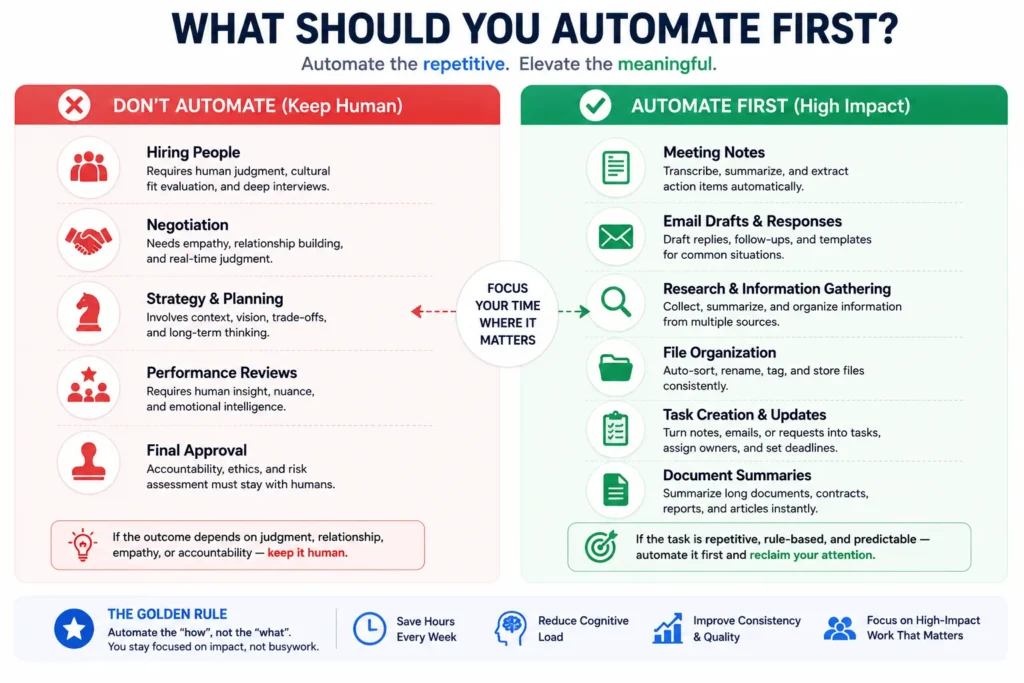
For a while, I believed every repetitive task should be automated.
It sounded logical.
If automation is good, more automation must be better.
I was wrong.
One Friday afternoon, I spent almost two hours trying to automate a process that normally took me six minutes.
When it finally worked, I felt strangely proud.
Then I did the maths.
At that rate, I’d need months before I actually saved any time.
That experience changed how I evaluate every new workflow.
Today I ask two questions before automating anything.
How often does this happen?
How much attention does it steal?
Not time.
Attention.
Some tasks only take three minutes, but they completely interrupt deep work.
Those are often better automation candidates than a thirty-minute task you only perform once a month.
Where AI Adds the Most Value
People sometimes imagine AI replacing the difficult parts of work.
I’ve found almost the opposite.
The greatest value comes from protecting the difficult parts.
Research becomes easier because information is already organized.
Writing becomes easier because the outline already exists.
Meetings become easier because the notes are already structured.
Projects move faster because nobody has to ask where the latest version of a document lives.
Notice what AI isn’t doing.
It’s not negotiating with a client.
It’s not deciding which supplier to choose.
It’s not resolving a disagreement between two colleagues.
Those moments still depend on experience, judgment, and trust.
Automation creates space for those conversations.
It doesn’t replace them.
My Rule: Never Automate a Decision
This is probably the rule I repeat most often.
Automate preparation.
Not judgment.
Let AI collect information.
Summarize reports.
Draft emails.
Organize notes.
Suggest next steps.
Then stop.
The final decision should still belong to a person.
I’ve ignored this rule before.
Usually because I was in a hurry.
Every time I did, I ended up reviewing the work more carefully than if I’d written it myself.
The irony wasn’t lost on me.
Automation should reduce cognitive load.
If it creates anxiety instead, something about the workflow is wrong.
The Smallest Automation with the Biggest Impact
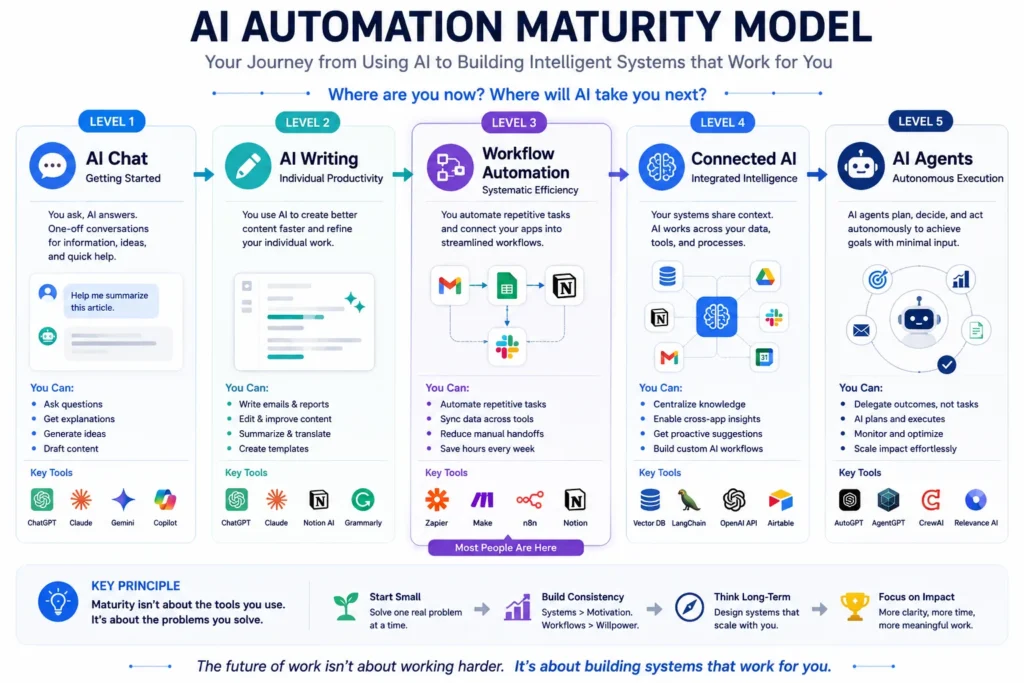
If someone asked me where to begin tomorrow morning, I wouldn’t recommend an advanced AI agent.
I’d recommend this.
Pick one task that happens every weekday.
Not every month.
Every day.
Maybe it’s creating meeting summaries.
Maybe it’s organizing invoices.
Maybe it’s preparing follow-up emails.
Automate that one process.
Leave everything else alone for a week.
Here’s why.
Most people don’t struggle because their workflows are too small.
They struggle because they change too many things at once.
When one automation works reliably, your confidence grows with it.
That’s how good systems are built.
Quietly.
One habit at a time.
The Toolkit I Keep Coming Back To
People love asking, “What’s the best AI tool?”
I’ve started answering a different question.
“What problem are you trying to solve?”
Because the answer changes everything.
If I’m exploring a new topic, I reach for Perplexity before I open a search engine.
If I’m working through a long contract or technical document, NotebookLM usually saves me more time than any chatbot.
If I need to shape an idea into a clear article or proposal, ChatGPT and Claude each have strengths depending on whether I’m refining structure or improving clarity.
When different apps need to talk to each other, Zapier or Make quietly do the work I used to do manually.
None of these tools is the hero.
The workflow is.
That’s an important distinction.
Tools will evolve.
Some will disappear entirely.
A good workflow survives software updates.
What Changed My Mind About Productivity
For years, I measured productivity by output.
How many emails I answered.
How many documents I finished.
How many meetings I attended.
AI made me question that way of thinking.
Now I pay more attention to something else.
How many times did I lose my focus today?
If the answer is twenty, it doesn’t matter how fast I type.
If the answer is five, I usually finish better work.
That shift sounds subtle.
It isn’t.
Because attention is where good ideas come from.
Not speed.
Final Thoughts
When people talk about AI, the conversation often becomes a race.
Which model is smarter?
Which chatbot is faster?
Which platform has the newest feature?
Those are interesting questions.
They’re just not the questions that changed the way I work.
The question that mattered was much simpler.
Why am I still doing the same work twice?
That single question forced me to look beyond software.
It made me notice the invisible routines that quietly shaped every day.
The extra copy-and-paste.
The document renamed three times.
The meeting notes rewritten in two different places.
The follow-up email created from scratch for the hundredth time.
None of those tasks looked important.
Together, they determined how much attention I had left for work that actually mattered.
That’s why I no longer think automation is about saving time.
Time is only part of the story.
The real goal is protecting your ability to think deeply without being interrupted by work that never required your judgment in the first place.
Technology will continue to improve.
Next year there will be new models, new platforms, and new promises about working faster.
Some of them will be genuinely useful.
Many will disappear.
The people who benefit the most won’t be the ones chasing every new release.
They’ll be the ones who understand their own work well enough to redesign it.
Because the most valuable workflow isn’t the most complex one.
It’s the one you stop thinking about because it simply works.
And perhaps that’s the quiet promise of AI automation.
Not that it helps you do more.
But that it gives you back enough attention to do your best work.
Frequently Asked Questions
Do I need to know how to code?
No. Most modern automation platforms are designed for people who have never written code. Understanding your workflow is far more important than understanding programming.
Should I automate everything?
Definitely not. Start with repetitive tasks that follow clear patterns. Leave decisions, negotiations, and relationship-driven work to people.
Which automation platform should I choose?
There’s no universal answer. Choose the platform that fits the tools you already use. The workflow matters more than the brand name.
What’s the biggest mistake beginners make?
Building complex automations before understanding their own daily habits. Observe your work first. Automate second.