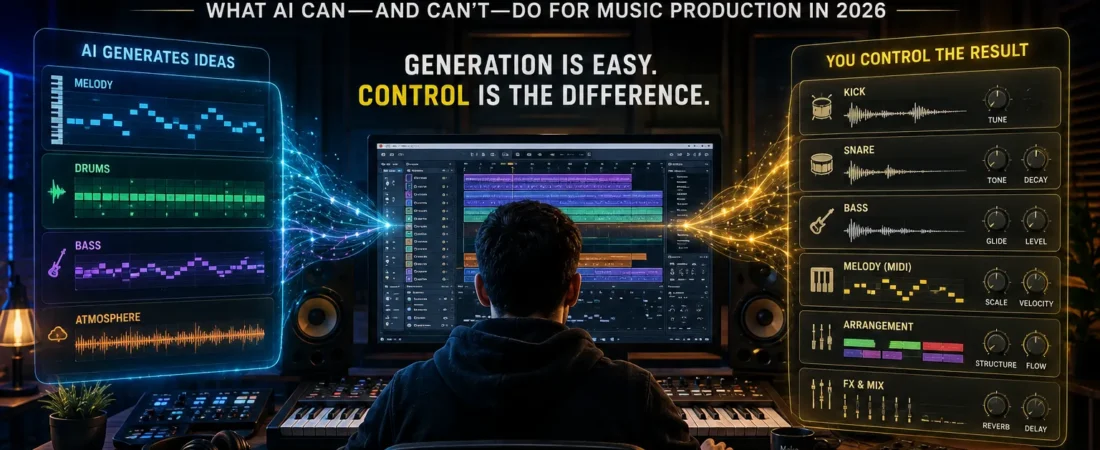
What AI Can—and Can’t—Do for Music Production in 2026
Type a sentence.
Wait a few seconds.
A finished song appears.
Drums.
Bass.
Melody.
Vocals.
Arrangement.
Sometimes even something that sounds surprisingly close to a track you might hear on Spotify.
The first time you experience modern AI music generation, it’s difficult not to ask the obvious question:
Why would anyone spend three hours making a beat anymore?
Open a DAW.
Choose a kick.
Adjust the snare.
Build a chord progression.
Program the bass.
Layer percussion.
Automate effects.
Mix everything.
Or type:
Dark melodic trap beat, 140 BPM, atmospheric synths, heavy 808s, emotional late-night feeling.
And press Generate.
It looks like the computer just won.
But there’s a problem.
Making music and producing the exact track you intended to make are not the same thing.
That’s where AI beatmaking becomes much more interesting.
AI Is Already Very Good at the First 30 Seconds
If your test is:
Can AI make something that sounds like music?
The answer isn’t particularly interesting anymore.
Yes.
The better systems can generate rhythm, harmony, instrumentation, structure, vocals, and production simultaneously.
What impresses me more is how quickly they can establish a mood.
Ask for something dark.
You get dark.
Ask for nostalgic.
The chords change.
Ask for aggressive.
The drums hit differently.
For someone who has never opened Ableton Live, FL Studio, Logic Pro, or another DAW, that feels almost impossible.
You’ve skipped years of technical knowledge and arrived at something resembling a finished recording.
But listen longer.
Then try to change one very specific thing.
That’s where the relationship changes.
“Make It Better” Is Easy. “Move That Snare” Is Harder.
Imagine you’ve generated a beat you genuinely like.
The drums work.
The bass works.
The atmosphere is excellent.
But there’s one problem.
You don’t like the snare.
A producer working inside a DAW can replace it.
Click.
Done.
Now imagine telling a generative music system:
Keep absolutely everything identical, but replace only this snare with a shorter, darker snare and leave the rest of the mix untouched.
That’s a much more difficult request.
Maybe the snare changes.
Maybe the drums change too.
Maybe the bass feels different.
Maybe the entire generation shifts slightly.
This reveals one of the most important differences between traditional music production and generative AI.
A DAW gives you control over components.
Generative AI often gives you control over direction.
Those aren’t the same thing.
The Producer’s Real Superpower Is Control
People often assume music production is mainly about creating sounds.
It isn’t.
A huge part of production is making tiny decisions.
This kick.
Not that kick.
Move the hi-hat slightly.
Lower the bass.
Mute everything for half a bar.
Bring the vocal in later.
Add reverb only to the last word.
Make the second chorus bigger than the first.
Those decisions create identity.
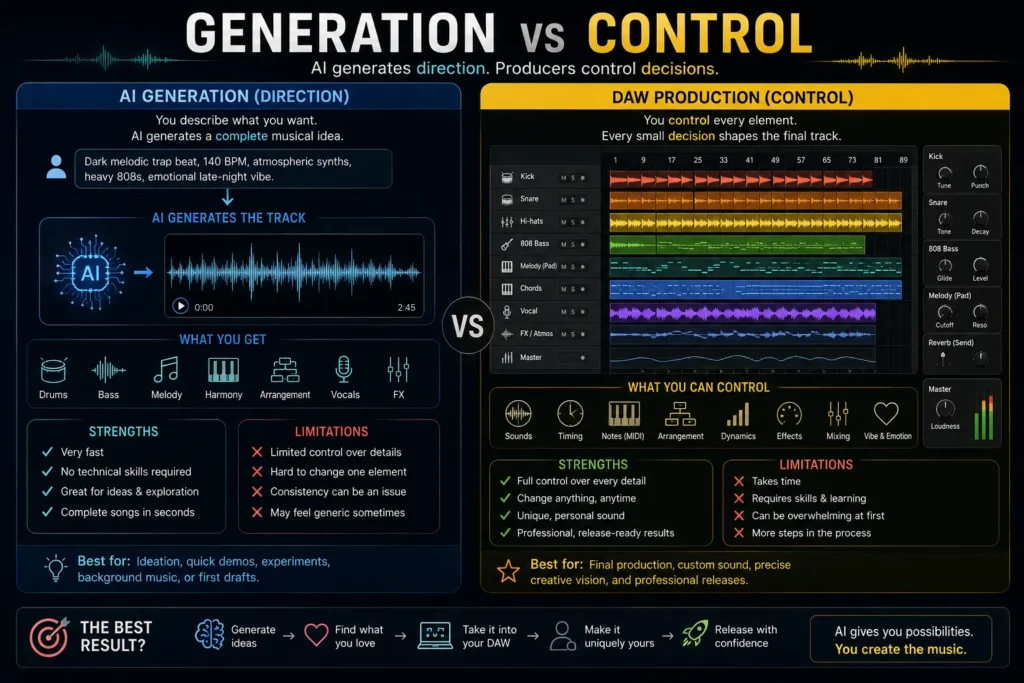
AI can generate thousands of musical decisions incredibly quickly.
The question is how many of those decisions you can individually control afterward.
That’s why I don’t think the most useful comparison is:
AI music vs human music.
A better comparison is:
Generation vs control.
There Are Actually Three Different Ways to Make Music With AI
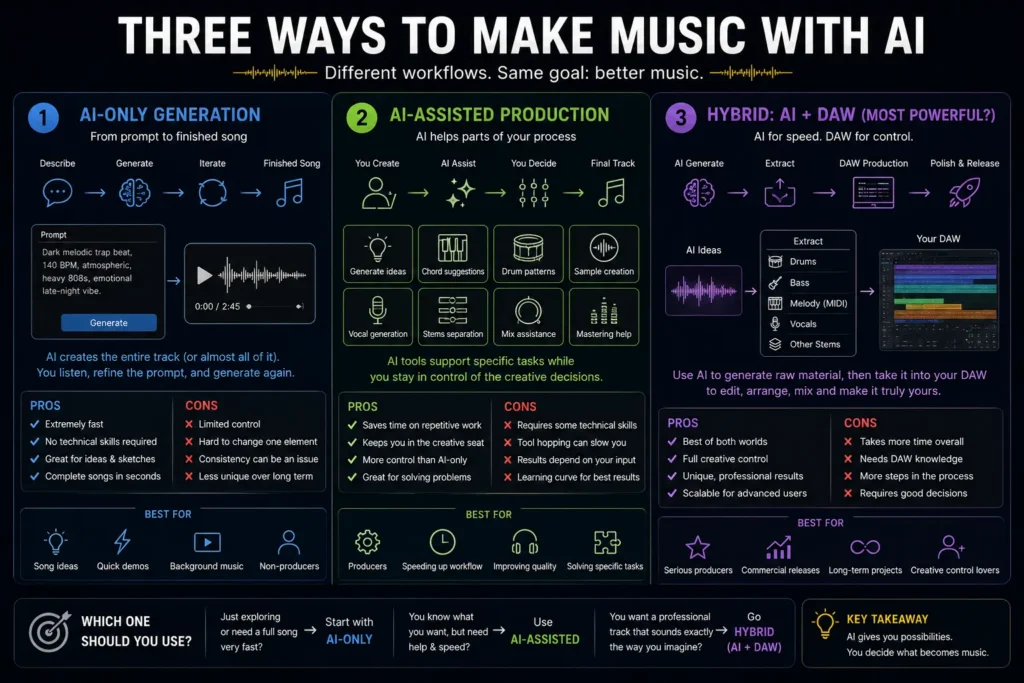
When people say “AI music,” they often mix several completely different workflows together.
1. Full-Song Generation
You describe what you want.
AI generates most or all of the track.
This is the workflow people usually imagine first.
It’s incredibly fast.
It’s excellent for experimentation.
It’s also the workflow where you may have the least granular control.
2. AI-Assisted Production
You still work inside a traditional production environment.
AI helps with pieces of the process.
Maybe:
- generating musical ideas,
- separating stems,
- creating samples,
- suggesting chords,
- cleaning audio,
- generating vocals,
- mastering,
- removing noise,
- exploring arrangements.
Here, AI doesn’t replace the DAW.
It becomes another instrument inside it.
3. Hybrid Production
This is the workflow I find most interesting.
Start with AI.
Find something worth keeping.
Extract or recreate the useful pieces.
Move them into a DAW.
Then produce the track manually.
Now AI provides speed.
The DAW provides control.
That combination may be much more powerful than forcing either approach to do everything.
Imagine You’re Making a Hip-Hop Beat
Let’s make this practical.
You want a dark melodic hip-hop beat.
Traditional workflow
You might:
- choose a tempo,
- build a chord progression,
- find a melody,
- program drums,
- design the 808,
- arrange sections,
- add transitions,
- mix,
- master.
That could take an experienced producer an hour.
Or a day.
Or three days.
Depends on the track.
AI-first workflow
You describe the mood.
Generate several ideas.
Discard most of them.
Keep one.
Then ask yourself:
What exactly do I like here?
Maybe it’s the chord progression.
Maybe it’s the texture.
Maybe it’s the drum rhythm.
Maybe it’s simply the atmosphere.
Now take that useful idea into the rest of the production process.
This is where AI stops being a replacement producer and starts becoming something closer to an extremely fast sketchbook.
The 10-Generation Test
Here’s a test I’d use before judging any AI music generator.
Don’t generate one track.
Generate ten.
Same concept.
Same creative direction.
Then ask:
How many contain something I would actually keep?
Not:
How many sound impressive?
That’s too easy.
Ask:
How many contain a melody, groove, texture, arrangement, or performance I would willingly build a real track around?
That distinction matters.
It’s very similar to AI video.
The first impressive generation tells you what the technology can do.
The tenth generation tells you whether the workflow is useful.
AI Could Make Beatmaking More Human, Not Less
That sounds strange.
But think about what beginners currently face.
They open a DAW.
Hundreds of buttons.
Plugins.
Routing.
EQ.
Compression.
Sidechain.
MIDI.
Automation.
Gain staging.
Sample libraries.
Before they can express an idea, they have to learn a machine.
AI potentially reverses that relationship.
Start with:
I want something that feels lonely but still has enough energy for someone to rap over.
That’s a musical idea.
Not a technical instruction.
The technology can help turn that idea into sound.
Then the producer decides what deserves to survive.
If AI lowers the technical barrier while humans keep creative control, more people may be able to make music.
That balance—using AI to remove technical friction without outsourcing creative judgment—is becoming one of the most important skills in AI-assisted work.
That’s genuinely exciting.
But There Is a Dangerous Shortcut
There’s another possible workflow.
Generate.
Download.
Upload.
Generate.
Download.
Upload.
Again and again.
No editing.
No decisions.
No real understanding of why one track works and another doesn’t.
Technically, you’re producing more music.
Creatively, I’m not sure you’re producing much at all.
This is the same problem we’ve seen with AI writing, AI images, and AI video.
When generation becomes nearly free, selection becomes more valuable.
Which melody is worth keeping?
Which beat deserves another hour?
Which generation sounds generic?
Which imperfection gives the track character?
The easier creation becomes, the more important taste becomes.
What I Would Actually Want From an AI Beatmaking Tool
I don’t need an AI that can generate one million finished songs.
I’d rather have one that lets me say:
Keep the drums.
Replace the bass.
Give me the MIDI for the chords.
Export the melody separately.
Remove the vocal.
Extend this section by eight bars.
Keep the groove but change the instrumentation.
Give me stems.
Let me edit every piece afterward.
That’s the direction where AI music becomes genuinely powerful for producers.
Not:
“AI made the song.”
But:
“AI gave me material I can actually produce.”
And that difference will probably determine which AI music tools survive after the novelty wears off.
The Moment AI Music Becomes a Production Tool
For me, the dividing line is simple.
Can I take what the AI created and continue making meaningful decisions?
If the answer is yes, I have a production tool.
If the answer is no, I have a generation machine.
Both can be useful.
But they’re useful for very different reasons.
A casual creator may be perfectly happy generating a complete track and using the result.
A producer usually wants to get inside the track.
That’s where stems, MIDI, editable arrangements, isolated vocals, samples, and DAW integration begin to matter.
Stems Change Everything
Imagine AI generates a beat containing:
- drums,
- bass,
- piano,
- strings,
- percussion.
You love the piano.
You hate the drums.
If the entire generation exists as one stereo audio file, your options are limited.
Now separate it into stems.
Suddenly you can keep the piano.
Delete the drums.
Replace the bass.
Add your own percussion.
Process the strings differently.
Rearrange the song.
The AI generation has stopped being the finished product.
It’s become raw material.
That is a much more interesting relationship between musicians and AI.
MIDI May Be Even More Valuable
Audio gives you sound.
MIDI gives you decisions you can change.
Suppose AI creates a beautiful chord progression.
If you only have the audio, you can sample it.
Useful.
But if you have MIDI, you can:
- change the instrument,
- move individual notes,
- change the key,
- alter the voicing,
- modify the rhythm,
- extend the progression,
- build entirely new sections.
The musical idea becomes editable.
For beatmakers, that’s incredibly powerful.
I suspect one of the most useful directions for AI music won’t simply be generating better finished songs.
It will be generating better editable musical material.
Where Suno Fits
Suno represents the most obvious version of the prompt-to-song experience.
Describe the song.
Generate.
Listen.
Iterate.
That simplicity is exactly why tools like it attracted so much attention.
You don’t need to understand synthesis.
You don’t need to program drums.
You don’t even necessarily need to sing.
For:
- song ideation,
- rapid demos,
- experimenting with genres,
- discovering unexpected directions,
- creating complete musical sketches,
that can be incredibly useful.
But if you’re an experienced producer, the important question comes afterward.
How much control do I have once I hear something I like?
That’s the question I’d use to evaluate every new music-generation feature.
Not merely:
Does the output sound good?
But:
Can I turn the good output into my track?
Where Udio Fits
Udio belongs in the same broader category but should be evaluated by the same production-oriented standard.
Can it produce interesting musical ideas?
Can those ideas be extended?
Can sections be revised?
Can useful elements be isolated?
How predictable are revisions?
How easily can the result move into the next stage of production?
These questions matter more to me than whether one generator wins a blind test by a few percentage points.
AI music models will improve.
Rankings will change.
Editability remains valuable regardless of which model is leading.
That’s an important distinction if you’re building a workflow that needs to survive longer than one product cycle.
AI + DAW Is Where Things Get Serious
Now imagine a different workflow.
You generate ten musical ideas.
One has an interesting chord progression.
Another has a drum pattern you like.
A third inspires a vocal melody.
Instead of asking AI to finish everything, you move the useful material into your DAW.
Maybe that’s:
- Ableton Live,
- FL Studio,
- Logic Pro,
- Cubase,
- Studio One,
- another production environment.
Now you take control.
Replace the kick.
Rebuild the bass.
Change the chords.
Record a real vocal.
Automate effects.
Change the arrangement.
Mix everything properly.
The final track may have begun with AI.
It doesn’t have to end there.
This is the workflow I find much more convincing than:
Prompt → Generate → Upload.
Can AI Make Drums?
Absolutely.
But that’s not really the interesting question.
The interesting question is:
Can AI make the exact drums you hear in your head?
Suppose you want:
- a dry kick,
- slightly late snare,
- loose hi-hats,
- occasional triplets,
- almost no percussion in the verse,
- much wider drums in the chorus.
A producer can program that deliberately.
A generative system may interpret the direction.
Sometimes brilliantly.
Sometimes approximately.
This is where manual sequencing remains powerful.
AI is excellent at proposing grooves.
Humans remain very good at obsessing over three milliseconds.
Music needs both kinds of thinking.
Can AI Make Melodies?
This may be one of AI’s most natural strengths.
Generate enough variations and you’re likely to hear something interesting.
But there’s an uncomfortable question:
Is it interesting because it’s original—or because it resembles patterns we’ve already heard thousands of times?
That problem isn’t unique to AI.
Human producers also absorb enormous amounts of music and recombine familiar ideas.
But AI can generate familiar-sounding material at enormous scale.
That makes selection even more important.
A technically competent melody isn’t automatically a memorable melody.
The producer still has to recognize the difference.
Can AI Mix a Track?
AI already assists with parts of mixing.
Noise reduction.
Level suggestions.
EQ assistance.
Vocal cleanup.
Stem separation.
Mastering.
These tools can save enormous amounts of time.
But mixing isn’t merely fixing frequencies.
Mixing contains creative decisions.
Should the vocal feel intimate?
Should the drums dominate?
Should the chorus suddenly become wide?
Should the bass feel clean—or slightly dangerous?
A technically “correct” mix isn’t always the right mix.
That’s why I think AI will automate a large amount of corrective audio work before it eliminates the need for creative mixing decisions.
Let the machine remove the noise.
You decide whether the vocal should feel like it’s whispering in someone’s ear.
Can AI Master Music?
This is probably one of the easiest areas for AI-assisted automation to understand.
Mastering already involves repeatable technical objectives:
- loudness,
- tonal balance,
- dynamics,
- translation across playback systems.
Automated mastering can be enormously useful for:
- demos,
- independent releases,
- reference tracks,
- quick comparisons.
But high-level mastering is still partly contextual.
What is the track supposed to feel like?
What other songs are on the album?
How much dynamic range should remain?
Is maximum loudness even desirable?
Again, AI can optimize.
Someone still needs to decide what it’s optimizing for.
What About Vocals?
This is where AI music becomes both incredibly powerful and considerably more complicated.
AI can help create:
- guide vocals,
- harmonies,
- vocal textures,
- synthetic performances,
- transformations,
- experimental voices.
From a creative perspective, that’s extraordinary.
From a rights perspective, it demands more care.
A voice isn’t merely an instrument.
It can be connected to a real person’s identity.
If an AI vocal deliberately imitates a recognizable singer, the creative and legal questions become much more serious.
For commercial work, I would want clarity about:
- where the voice came from,
- what permissions exist,
- what the platform allows,
- whether the output can be commercially used,
- whether a recognizable person’s identity is being imitated.
“AI generated it” isn’t a universal answer to rights questions.
Can You Sell AI-Generated Beats?
This is where I would slow down before giving anyone a simple yes.
There are at least three different questions.
Does the platform allow commercial use?
Check the terms attached to your account and subscription.
Do you actually have the rights required for what you generated?
Platform permission and copyright ownership are not necessarily the same question.
Does the track contain anything that creates additional rights problems?
That might include:
- recognizable vocals,
- protected samples,
- imitated artists,
- third-party material,
- material you uploaded without sufficient rights.
These rules can also change.
So I wouldn’t build a music business around a screenshot of someone’s terms from two years ago.
Before releasing or selling AI-assisted music commercially, check the current terms for the exact service and plan you’re using.
Don’t Ask AI to “Make a Drake Beat”
This is another habit I would avoid.
It’s tempting because artist names communicate enormous amounts of information quickly.
But a better creative practice is learning to describe what you actually want.
Instead of:
Make a beat like Artist X.
Try:
Sparse nocturnal hip-hop production, minor-key electric piano, deep sub-bass, restrained drums, lots of negative space, intimate late-night atmosphere, around 75 BPM.
Now you’re describing musical characteristics.
That’s more useful creatively.
It also pushes you toward developing your own vocabulary rather than treating another artist’s identity as a preset.
The Beginner Has a Different Advantage
AI music could be particularly powerful for someone who has never produced before.
Traditionally, beginners face two problems simultaneously.
They don’t yet know exactly what they want.
And they don’t know how to create it.
AI can help separate those problems.
Generate variations.
Listen.
Ask:
Which one feels closer?
Then:
Why?
Maybe you discover that you prefer:
- minor chords,
- slower tempos,
- sparse drums,
- distorted textures,
- female vocals,
- unusual percussion.
You’re learning your own taste.
Then you can enter a DAW with much clearer creative intent.
In that sense, AI can become a gateway into music production rather than an alternative to learning it.
The Experienced Producer Has a Different Advantage
A producer doesn’t necessarily need AI to make a chord progression.
They already can.
Their scarce resource is often time.
So AI becomes useful for:
- generating alternatives,
- exploring directions quickly,
- creating rough demos,
- producing temporary material,
- finding textures,
- separating audio,
- cleaning recordings,
- accelerating repetitive technical work.
The beginner uses AI to access capability.
The professional uses AI to compress iteration.
Those are very different value propositions.
The Workflow I Would Use
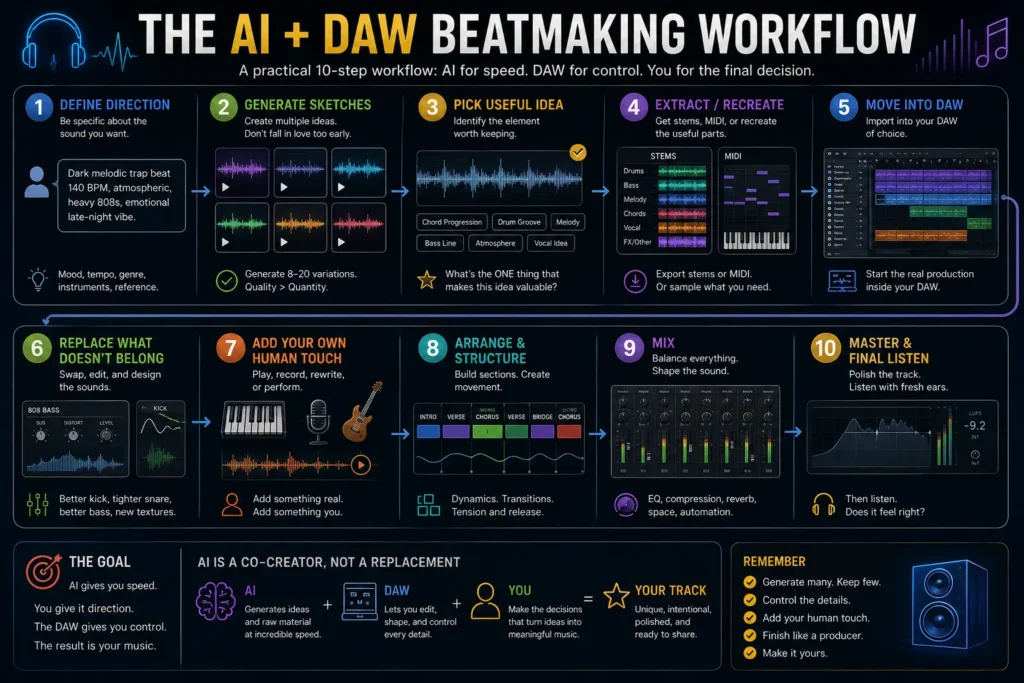
If I wanted to make a serious AI-assisted beat today, I wouldn’t begin with the goal of having AI finish it.
I’d use this workflow:
1. Define the direction
Genre isn’t enough.
Write the mood, tempo, energy, instrumentation, and intended use.
2. Generate multiple sketches
Never fall in love with generation number one.
3. Identify the valuable element
What are you actually keeping?
Chord progression?
Melody?
Texture?
Groove?
Arrangement?
4. Extract or recreate it
Use stems, MIDI, audio separation, sampling, or manual recreation where appropriate.
5. Move into the DAW
Now the track becomes editable.
6. Replace what doesn’t belong
Drums.
Bass.
Vocals.
Sounds.
Structure.
7. Add something that came from you
Play something.
Record something.
Rewrite something.
Make a decision the generator didn’t make.
8. Mix
Use AI assistance where it saves time.
Keep creative control.
9. Master
Automated mastering may be enough—or use a human when the project justifies it.
10. Listen without thinking about AI
This final step matters.
Forget how the track was created.
Ask:
Is this actually good music?
Technology doesn’t get bonus points in the final mix.
My AI Beatmaking Scorecard
If I were comparing AI music tools for producers, I’d evaluate:
Idea Quality
How often does it produce something worth developing?
Control
Can I change specific musical elements?
Editability
Can I obtain stems, MIDI, sections, or other useful components?
Consistency
Can I revise something without destroying everything I liked?
Audio Quality
Is the output production-ready or merely demo quality?
Workflow
How easily can I move the result into real production?
Speed
How quickly can I explore alternatives?
Rights Clarity
Can I clearly understand what I’m allowed to do with the output?
Cost per Usable Idea
How much did I spend before finding something I would genuinely keep?
Notice that last metric.
Not cost per song.
Cost per usable idea.
That’s much closer to how I would value an AI tool as a producer.
AI-Only vs AI + DAW
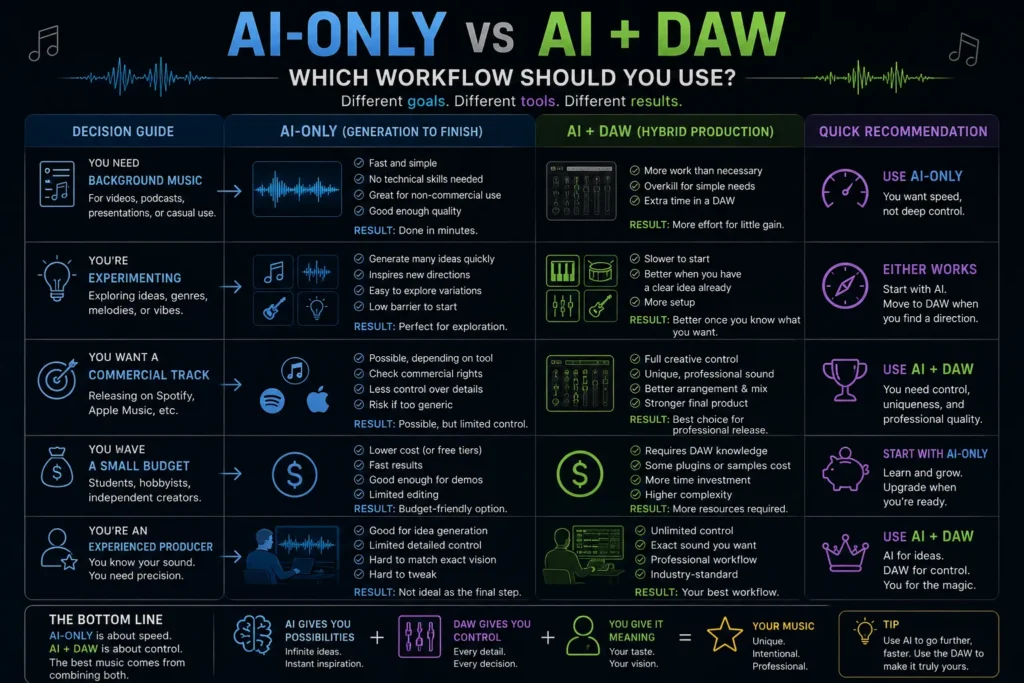
If your goal is:
Background music for a quick personal project
AI-only may be perfectly reasonable.
If your goal is:
Rapid musical experimentation
AI-only can be fantastic.
If your goal is:
A demo to communicate an idea
Again, extremely useful.
But if your goal is:
A track that sounds exactly the way you imagined
I’d choose:
AI + DAW.
The reason isn’t nostalgia.
It’s control.
The more specific your creative intention becomes, the more valuable editability becomes.
The Future Producer May Look More Like a Director
This is remarkably similar to what’s happening with AI video.
The creator doesn’t necessarily make every component manually.
Instead, they direct systems.
Generate options.
Reject most of them.
Combine pieces.
Modify them.
Make decisions.
The technical skill doesn’t disappear.
It changes.
Knowing how to compress a snare may remain useful.
But knowing why that snare is wrong for this song becomes even more valuable.
When machines can generate unlimited possibilities, taste becomes the bottleneck.
Final Thoughts
So, can AI really make a professional beat?
Yes.
That’s no longer the most interesting question.
AI can generate music that sounds remarkably polished.
The harder question is:
Can you turn that generation into music that feels deliberately yours?
That’s where the answer becomes more complicated.
If your workflow ends at Generate, AI made most of the decisions.
If generation is where your workflow begins, the possibilities become much more interesting.
Take the melody.
Change it.
Keep the atmosphere.
Replace the drums.
Rebuild the bass.
Record a vocal.
Destroy half the arrangement.
Add silence where AI filled every space.
Make choices.
Because music production has never really been about how many sounds you can create.
It’s about deciding which sounds belong together.
AI is going to become extraordinarily good at giving us possibilities.
Maybe millions of them.
That doesn’t make the producer irrelevant.
It makes the producer’s hardest skill more visible.
Taste.
When everyone can generate a technically impressive beat in seconds, the advantage won’t belong to the person who can generate the most.
It will belong to the person who knows what deserves to become a song.
Frequently Asked Questions
Can AI make professional-quality beats?
Yes, modern generative music systems can produce highly polished musical material and even complete tracks. Whether the result is suitable for a professional release depends on control, editability, audio quality, rights, and how much additional production the track requires.
Is AI going to replace DAWs?
Probably not for producers who need detailed control. AI generation and DAWs solve different problems: generation creates possibilities quickly, while a DAW allows precise editing, arrangement, mixing, and production.
Is Suno or Udio better for beatmaking?
That depends on their current models, editing features, export options, pricing, and the type of music you’re creating. Rather than choosing by output quality alone, compare how easily you can continue producing the result after generation.
Can I sell beats made with AI?
Possibly, but don’t assume every generated track has identical commercial rights. Check the current terms for the specific AI service and subscription plan, as well as any additional rights issues involving uploaded material, samples, or recognizable voices.
Should beginners learn a DAW if AI can already generate music?
I would. AI can dramatically lower the barrier to generating ideas, but learning a DAW gives you control over those ideas and teaches you how music is actually constructed.
What’s the best way to use AI for music production?
For serious production, a hybrid workflow is especially compelling: use AI to generate or explore material, extract the useful elements, then continue arranging, editing, mixing, and finishing the track inside a DAW.