Which AI Actually Helps You Learn Instead of Doing the Work for You?

A student sits down at a desk with a difficult assignment.

They read the first question.

Nothing.

They read it again.

Still nothing.

So they open an AI assistant, paste the question, and wait.

Five seconds later, the answer appears.

Problem solved.

Except there is another problem.

Did the student actually learn anything?

That’s the question I think gets lost in most conversations about AI and education.

We spend enormous amounts of time asking which AI gives the best answers.

For students, that may be the wrong way to judge them.

The better question is:

Which AI helps you become capable of answering the question yourself next time?


The Best Student AI Isn’t Necessarily the Smartest One

Search for the best AI for students and you’ll find endless lists.

ChatGPT.

Claude.

Gemini.

Perplexity.

NotebookLM.

And dozens of specialized study tools.

Usually they’re ranked by features.

Writing.

Summarization.

Research.

File uploads.

Flashcards.

But students aren’t businesses trying to maximize output.

They’re supposed to learn something along the way.

That changes the criteria completely.

An AI that completes an assignment in thirty seconds may be incredibly productive.

It may also be a terrible teacher.


The Calculator Problem Is Back

We’ve been here before.

When calculators became widely available, people worried students would stop learning mathematics.

The calculator itself wasn’t really the problem.

The question was when to use it.

If you’re learning multiplication, immediately reaching for a calculator removes the skill you’re supposed to practice.

If you’re analyzing a large dataset, refusing to use one wastes time on arithmetic instead of reasoning.

AI creates a similar problem on a much larger scale.

It can help with:

  • mathematics,
  • writing,
  • languages,
  • programming,
  • research,
  • science,
  • history.

That means the line between assistance and replacement becomes much harder to see.


I Wouldn’t Start by Asking for the Answer

Imagine you’re stuck on a mathematics problem.

The easiest prompt is:

Solve this problem for me.

You receive the solution.

Done.

I prefer a different sequence.

Start with:

Don’t solve it. Give me one hint.

Try again.

If you’re still stuck:

Tell me which step of my reasoning is wrong, but don’t give me the final answer.

Try again.

Then:

Show me a similar but easier problem.

Solve that.

Return to the original problem.

Now AI isn’t removing the struggle.

It’s controlling the amount of struggle.

That’s much closer to what a good tutor does.


ChatGPT: The Flexible Tutor

For general studying, ChatGPT’s biggest advantage is flexibility.

You can move quickly between different learning modes.

Ask for an explanation.

Then make it simpler.

Then request an example.

Then ask for a quiz.

Then explain your own answer and ask for criticism.

A useful study session might look like this:

Explain photosynthesis to me at high-school level.

Then:

Now ask me five questions, one at a time.

Then:

Don’t tell me the answer immediately if I’m wrong. Give me a hint first.

Then:

At the end, tell me which parts I still don’t understand well.

That is dramatically more valuable than:

Write my biology homework.

The same AI is being used.

The learning outcome is completely different.

Where ChatGPT fits best

  • interactive explanations,
  • practice questions,
  • brainstorming,
  • language practice,
  • coding help,
  • step-by-step tutoring,
  • switching rapidly between subjects.

For a student who wants one flexible AI for many different subjects, ChatGPT is an obvious place to start.


Claude: The Patient Reader

Now imagine the problem isn’t understanding one concept.

It’s understanding 80 pages of reading.

A research paper.

A long chapter.

Several reports that disagree with one another.

This is a different kind of work.

Claude often feels particularly comfortable when the task involves long documents, careful reading, structure, and extended analysis.

Instead of asking:

Summarize this PDF.

I would go further.

Ask:

What are the author’s three main arguments?

Then:

Which evidence supports each argument?

Then:

Which claim appears weakest?

Then:

What would someone who disagrees with this paper argue?

Now the AI isn’t simply shortening the reading.

It’s helping you interrogate it.

Where Claude fits best

  • long reading assignments,
  • document analysis,
  • comparing arguments,
  • essay structure,
  • detailed feedback,
  • working through complex material.

The important distinction is this:

Don’t use document AI to avoid reading. Use it to notice what you missed while reading.


NotebookLM: When Your Sources Matter More Than the AI

There’s another type of student problem.

You don’t want an AI to tell you everything it knows.

You want it to work with your material.

Lecture notes.

Professor slides.

PDFs.

Assigned readings.

Research sources.

That’s where NotebookLM becomes particularly interesting.

The center of the experience isn’t a blank chatbot.

It’s your source collection.

That changes the way you study.

Instead of asking:

Explain the French Revolution.

you can ask:

Based on the materials my professor provided, what were the three causes emphasized most strongly?

That’s a very different question.

For exam preparation, source-grounded studying can be more useful than receiving a generic explanation from the internet.

Where NotebookLM fits best

  • lecture materials,
  • course PDFs,
  • exam revision,
  • source-grounded questions,
  • comparing assigned readings,
  • building study guides from your own material.

Sometimes the best student AI isn’t the one that knows the most.

It’s the one that stays closest to what you’re actually supposed to learn.


Perplexity: Start Researching, Don’t Finish There

Research assignments create another problem.

Students need sources.

AI can make finding them dramatically faster.

Perplexity is useful because the research process begins with visible sources rather than a standalone answer.

Suppose you’re researching whether social media affects adolescent sleep.

Instead of opening ten search tabs immediately, you can begin by asking for an overview of:

  • major findings,
  • competing explanations,
  • recent studies,
  • useful terminology,
  • relevant sources.

That’s an excellent starting point.

But I would emphasize starting point.

A citation appearing beside an AI answer doesn’t remove the need to open the source.

Read it.

Check who published it.

Check when.

See whether the source actually supports the claim you intend to make.

Where Perplexity fits best

  • discovering sources,
  • exploring unfamiliar topics,
  • identifying research vocabulary,
  • getting an initial overview,
  • finding competing perspectives.

AI can shorten the distance between a question and a source.

It shouldn’t eliminate the source.


The Tool Matters Less Than the Prompt

Put ChatGPT, Claude, NotebookLM, and Perplexity side by side.

The temptation is to ask:

Which one wins?

But something else matters more.

Consider these two prompts.

Prompt A

Write my essay about climate change.

Prompt B

Here is my thesis. Don’t rewrite it. Ask me five difficult questions that would expose weaknesses in my argument.

The difference between those prompts may matter more educationally than the difference between the AI models.

One asks AI to perform.

The other asks AI to teach.

That’s the distinction I would want every student to understand before choosing any AI tool.


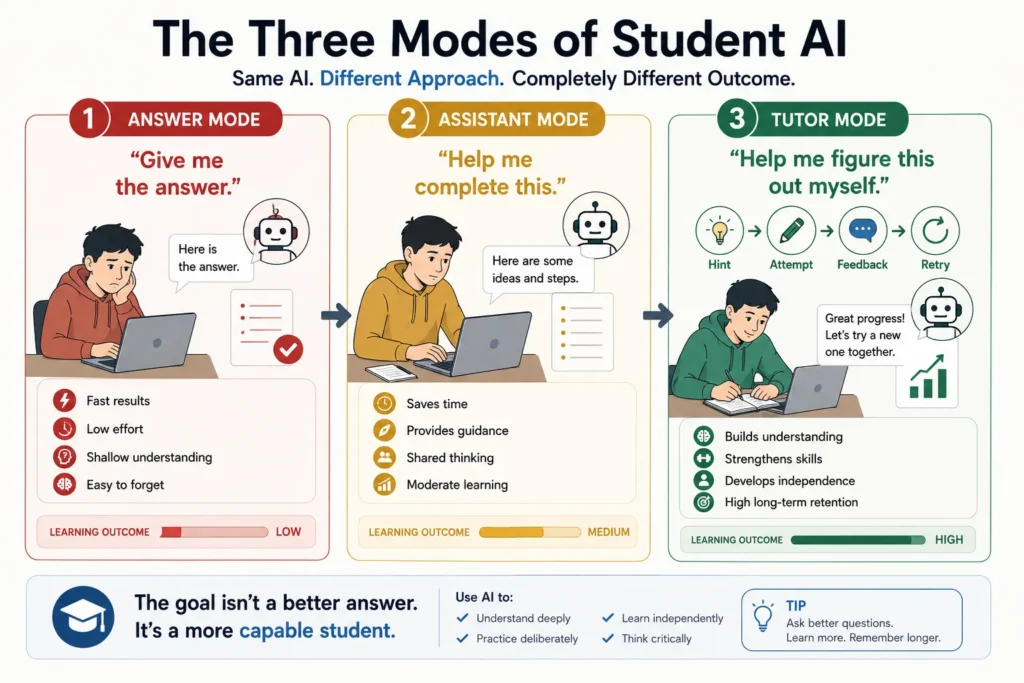
The Three Modes of Student AI

Infographic comparing Answer Mode, Assistant Mode, and Tutor Mode to show how different ways of using AI affect student understanding, independence, and long-term learning.

I find it useful to divide student AI use into three modes.

1. Answer Mode

Give me the answer.

Fast.

Convenient.

Sometimes necessary.

Usually the weakest mode for learning.

2. Assistant Mode

Help me complete this.

Much better.

The student still participates, but AI carries part of the work.

3. Tutor Mode

Help me understand this well enough to do it myself.

This is where AI becomes genuinely interesting for education.

The goal changes from completion to capability.

This is also why learning how to use AI without losing your own thinking matters just as much as choosing the right tool.

And once you make that shift, choosing the best AI becomes much easier.

Because you’re no longer asking which tool can do the most work for you.

You’re asking which one can help you do better work yourself.


Match the AI to the Way You Learn

Once you stop asking AI to simply produce answers, the comparison becomes much more useful.

The question is no longer:

Which AI is smartest?

It becomes:

What am I trying to learn right now?

A student struggling with calculus has a different problem from someone reading six research papers.

A language learner needs something different from a computer-science student debugging code.

So I wouldn’t recommend one AI for every student.

I’d match the tool to the learning task.


Best AI for Math: Choose the Best Tutor, Not the Fastest Solver

Math is where I would be particularly careful.

AI can produce a beautiful solution to a problem you don’t understand.

That creates an illusion of progress.

For everyday tutoring, ChatGPT can be extremely useful because the conversation can move gradually.

Instead of asking for the solution, try:

Give me the first step only.

Then:

Why is that step valid?

Then:

Give me a similar problem and let me solve it.

Finally:

Check my reasoning, not just my answer.

That last instruction matters.

Getting the correct number doesn’t necessarily mean you understand the mathematics.

For calculations or symbolic work, dedicated mathematical tools may still be useful alongside an AI tutor.

The AI explains.

You solve.

The calculator verifies.

That’s a healthier division of labor.


Best AI for Writing: Start With Your Ideas

Writing assignments create almost the opposite problem.

AI is so good at producing acceptable prose that it’s tempting to skip directly to the finished essay.

I wouldn’t.

Start with something that belongs to you.

A thesis.

Three observations.

An argument.

A rough outline.

Even disagreement with the assignment.

Then use AI to improve it.

ChatGPT is particularly useful for rapid iteration:

Give me three ways to organize this argument.

Which paragraph is weakest?

Where am I repeating myself?

What would make this introduction more specific?

Claude can be especially useful when you’re working with a longer draft and want feedback on structure, consistency, or argument.

But I would keep one rule:

AI can improve your writing before it replaces your writing.

A polished essay you cannot defend in class isn’t a strong essay.

It’s borrowed fluency.


Best AI for Research: Use More Than One Layer

Research is where I would rarely rely on a single AI.

The workflow matters more than the tool.

Step 1 — Explore

Use a research-oriented AI or search tool to understand the territory.

What terminology should you know?

Who are the major researchers?

Where do experts disagree?

Step 2 — Find

Locate actual papers, reports, books, statistics, and primary sources.

Step 3 — Read

This part still matters.

AI can help you navigate a difficult paper, but it shouldn’t become your only contact with the paper.

Step 4 — Interrogate

Now use Claude, ChatGPT, or another capable assistant to ask:

What assumption does this study depend on?

Does this paper contradict the previous one?

Which evidence actually supports my thesis?

Step 5 — Verify

Before a claim enters your assignment, confirm it in the source.

This takes longer than asking AI to write the research paper.

That’s the point.

Research isn’t supposed to be the fastest possible route from question to paragraph.

It’s supposed to be a defensible route from evidence to conclusion.


Best AI for Coding: Don’t Let It Become Magic

Coding assistants can make beginners feel incredibly powerful.

Describe a program.

Receive code.

Run it.

It works.

That feeling is addictive.

But there’s a test worth applying:

Can you explain what the code does without asking AI?

If not, you’re building on something you don’t control.

For students, I would use AI heavily for:

  • explaining errors,
  • comparing approaches,
  • generating practice exercises,
  • reviewing code,
  • explaining unfamiliar syntax,
  • suggesting tests.

I would use it more cautiously for:

  • writing an entire assignment,
  • generating a complete project you can’t explain,
  • fixing code by repeatedly pasting errors without understanding the cause.

A useful prompt is:

Don’t rewrite my code. Tell me where you think the bug is and ask me what I would try first.

That’s slower than clicking “fix.”

It’s also much closer to learning programming.


Best AI for Languages: Make It Talk Back

Language learning may be one of the best uses of conversational AI.

You can create a patient conversation partner that never gets tired.

Ask it to speak only in Italian.

Or Spanish.

Or Japanese.

Set the difficulty.

Ask it to correct only major mistakes.

Role-play a restaurant.

A job interview.

An airport.

A university presentation.

Then change the rules:

Don’t translate unfamiliar words immediately. Explain them using simpler Italian first.

Now the AI isn’t functioning as Google Translate.

It’s forcing you to stay inside the language.

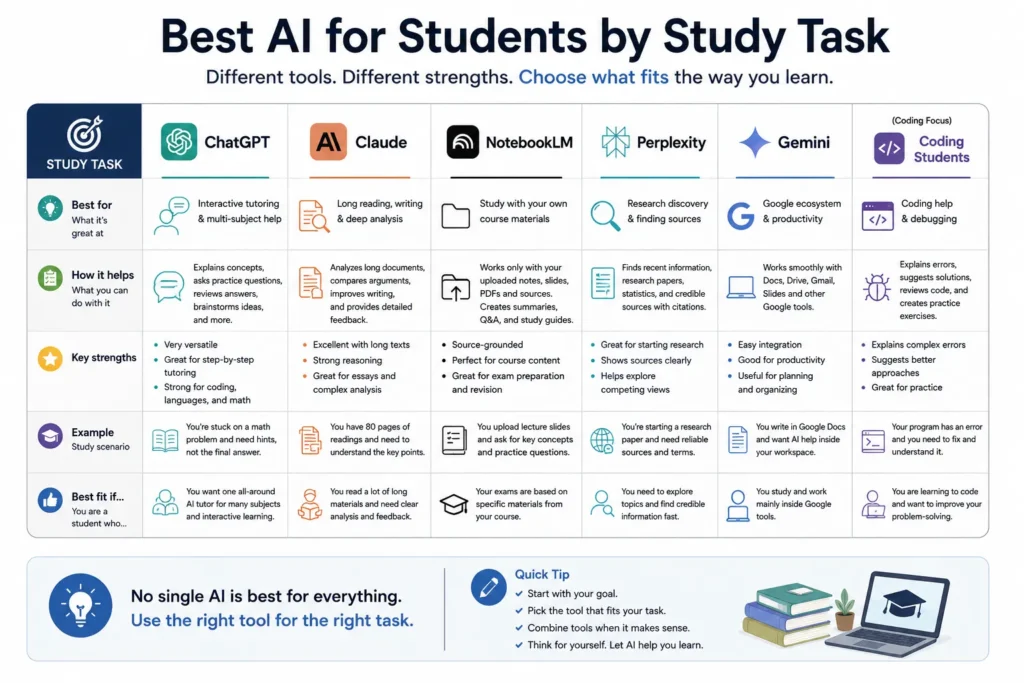
For language learning, that friction is valuable.

Comparison guide showing when students should use ChatGPT, Claude, NotebookLM, Perplexity, Gemini, or coding AI based on tutoring, long reading, course materials, research, Google workflows, and programming.

The Student I Would Recommend ChatGPT To

I’d lean toward ChatGPT for a student who wants one general-purpose assistant covering many subjects.

Especially someone who frequently moves between:

  • explanations,
  • practice questions,
  • brainstorming,
  • coding,
  • writing,
  • language practice.

Its versatility is the advantage.

If you’re paying for only one general AI assistant, breadth matters.


The Student I Would Recommend Claude To

I’d lean toward Claude when a large part of the student’s workload involves:

If you’re deciding between the two more broadly, I’ve compared Claude vs ChatGPT for different kinds of work in a separate guide.

  • lengthy readings,
  • academic papers,
  • essays,
  • document comparison,
  • careful analysis.

The more your study involves sitting with long material and pulling arguments apart, the more valuable that style of assistant becomes.


The Student I Would Recommend NotebookLM To

NotebookLM becomes especially attractive when the exam is based on a defined collection of material.

Your professor gives you:

  • slides,
  • lecture notes,
  • PDFs,
  • readings,
  • handouts.

You don’t necessarily need the entire internet.

You need to understand those materials.

That’s where source-grounded studying becomes powerful.


The Student I Would Recommend Perplexity To

I’d consider Perplexity when the problem begins with:

I don’t know where to start researching this.

It can help map the topic and surface sources quickly.

But I wouldn’t treat the generated answer as the finished research.

Think of it as the entrance to the library.

Not the book you cite without opening.


What About Gemini?

Gemini deserves consideration too, particularly for students already working heavily inside Google’s ecosystem.

If your academic life already revolves around Google Docs, Drive, Gmail, and other Google services, integration can matter as much as raw model capability.

This is another reason universal rankings are misleading.

The best AI isn’t always the one that wins an isolated prompt test.

Sometimes it’s the one that fits naturally into the environment where you already study.


Free AI vs Paid AI for Students

Here’s where I’d resist another common temptation.

Don’t subscribe simply because the paid model is more powerful.

Start free.

Use AI for real studying for several weeks.

Notice where you actually hit limitations.

Maybe you need:

  • more usage,
  • better document handling,
  • stronger models,
  • longer workflows,
  • additional research features.

Then consider paying.

A subscription makes sense when it removes a real limitation you repeatedly encounter.

Not when you’re paying because everyone online says you need the premium version.

For many students, free access to one or more capable AI tools may already be enough.


When I Would Not Use AI

There are moments when I would close it completely.

Before forming an opinion

If the assignment asks what you think, give yourself a few minutes to think first.

During recall practice

If you’re testing whether you remember something, looking at AI defeats the purpose.

When learning a foundational skill

Sometimes struggling through the process is the lesson.

During assessments where AI isn’t permitted

Obvious, but important.

Academic rules vary by school, course, and instructor.

When you notice yourself copying before reading

That’s a warning sign.

The AI has stopped being a study tool.

It’s becoming a substitute for participation.


The One Prompt I Wish More Students Used

If I could give students only one AI prompt, it wouldn’t be an elaborate prompt template.

It would be this:

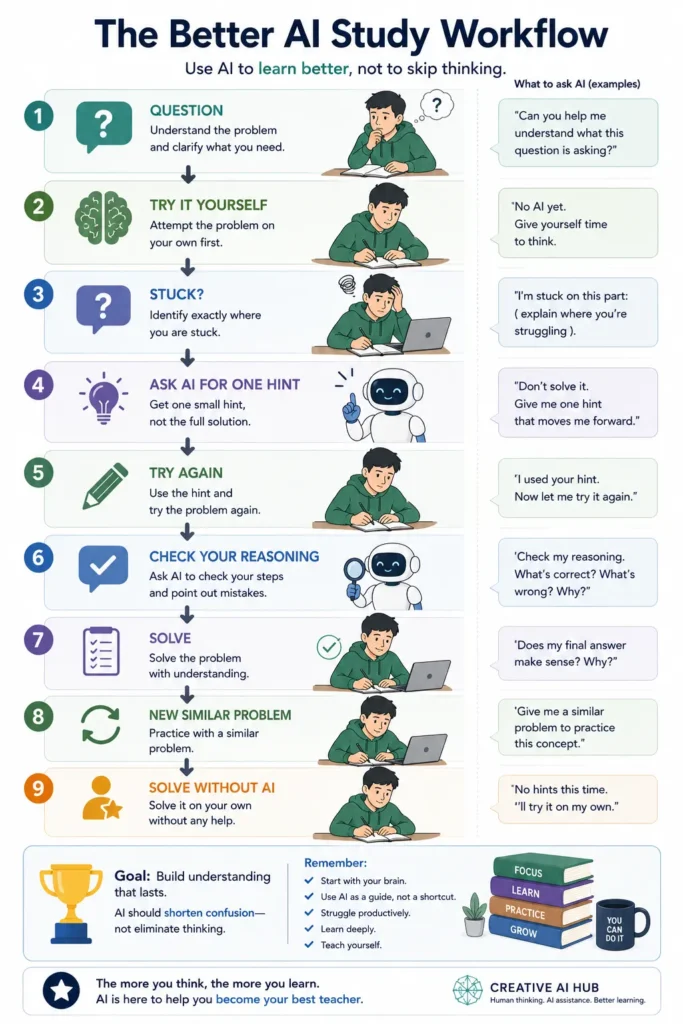
Don’t give me the answer yet. Help me figure it out myself.

Nine-step AI study workflow showing students how to attempt a problem independently, ask AI for one hint, check their reasoning, practice again, and finally solve without AI.

Then continue the conversation.

Give me one hint.

Ask me what I already know.

Tell me where my reasoning went wrong.

Give me an easier example.

Test me again without showing the solution.

Those prompts turn almost any capable AI into a much better learning tool.

Not because the model changes.

Because your relationship with it does.


My Practical Recommendation

If you’re choosing today, I would think about it this way.

Choose ChatGPT if…

You want one flexible AI for many subjects and highly interactive tutoring.

Choose Claude if…

Long reading, writing, and careful document analysis dominate your workload.

Choose NotebookLM if…

Your learning revolves around a defined set of course materials.

Choose Perplexity if…

Research discovery and finding sources are frequent parts of your work.

Consider Gemini if…

Your study workflow already lives heavily inside Google’s ecosystem.

Use more than one if…

You have a genuine reason.

Research with one.

Read with another.

Practice with another.

But don’t collect AI subscriptions like stationery.

More tools don’t automatically create more learning.


A Better Way to Measure AI for Students

Forget for a moment about:

  • model rankings,
  • benchmark scores,
  • token limits,
  • feature counts.

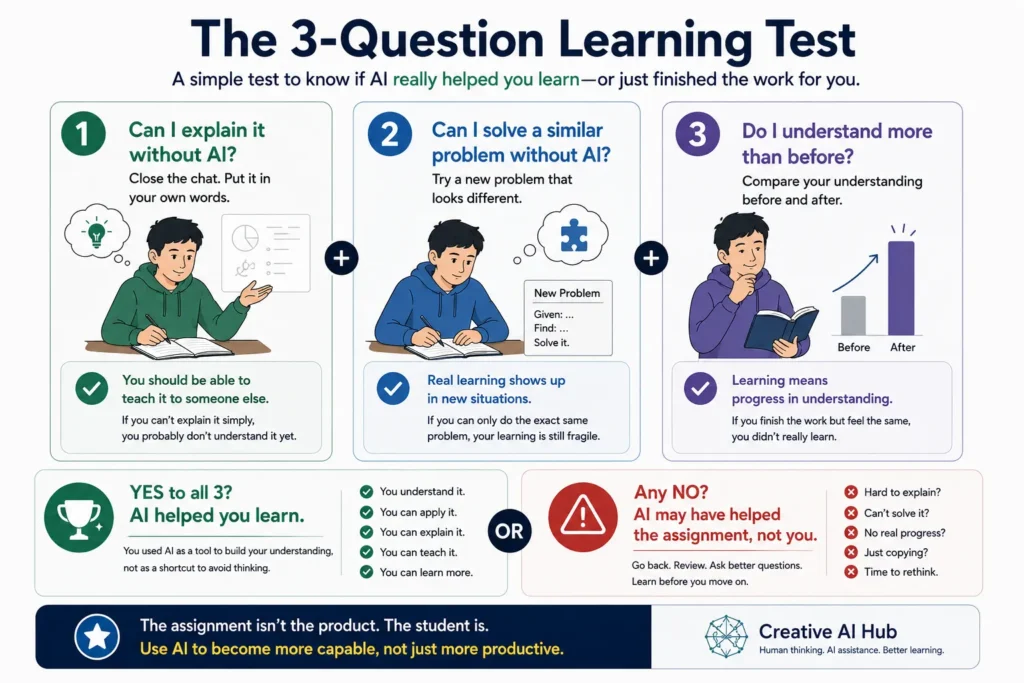
At the end of a study session, ask yourself three questions.

Three-question test asking whether a student can explain a concept, solve a similar problem without AI, and demonstrate greater understanding after using an AI study tool.

Can I explain this without AI?

Can I solve a similar problem without AI?

Do I understand more than I did before I opened AI?

If the answer is yes, the tool probably helped.

If the only thing that improved was the quality of the assignment sitting on your screen, I’d be more cautious.

Because the assignment isn’t the product of education.

The student is.


Final Thoughts

AI may become one of the most powerful educational tools we’ve ever had.

A private tutor that is available at midnight.

A conversation partner for a language nobody around you speaks.

A coding assistant that can explain an error twenty different ways.

A research guide that can help you find the first path into an unfamiliar subject.

That’s extraordinary.

But the same technology can also make it incredibly easy to skip the exact mental work education is supposed to develop.

The difference isn’t simply which AI you choose.

It’s what you ask it to do.

Ask it to replace the difficult parts and you’ll finish faster.

Ask it to help you through the difficult parts and you may actually become better.

For students, that’s the comparison that matters most.

Not:

Which AI gives the best answer?

But:

Which way of using AI leaves me more capable when the screen is closed?

Choose your tools around that question and the rankings become much less important.

Learning becomes the point again.


Frequently Asked Questions

What is the best AI for students in 2026?

There isn’t one best option for every student. ChatGPT is a strong general-purpose choice, Claude can be useful for long documents and writing, NotebookLM is valuable for source-based studying, Perplexity can help with research discovery, and Gemini may suit students working heavily in Google’s ecosystem.

Is ChatGPT or Claude better for students?

It depends on the work. ChatGPT is particularly versatile for interactive tutoring and switching between subjects, while Claude can be attractive for long reading, analysis, and writing-heavy study.

Is NotebookLM better than ChatGPT for studying?

For studying a fixed collection of course materials, NotebookLM can have an important advantage because the workflow centers on the sources you provide. For broader tutoring and interactive practice across many subjects, ChatGPT may be more flexible.

Can students use AI without hurting their learning?

Yes, but the method matters. Asking for hints, feedback, explanations, practice questions, and challenges preserves much more of the learning process than simply requesting finished answers.

Should students pay for AI?

Not automatically. Start with free options and pay only when you repeatedly encounter a limitation that materially affects your studying.