Writing software has never been easier.
A few years ago, developers spent hours searching documentation, fixing syntax errors, and writing repetitive code by hand.
Today, AI coding assistants can generate code, explain complex functions, detect bugs, and even help build complete applications from simple instructions.
Whether you’re an experienced developer or someone learning to code for the first time, AI can dramatically improve your productivity.
But which coding assistant should you choose?
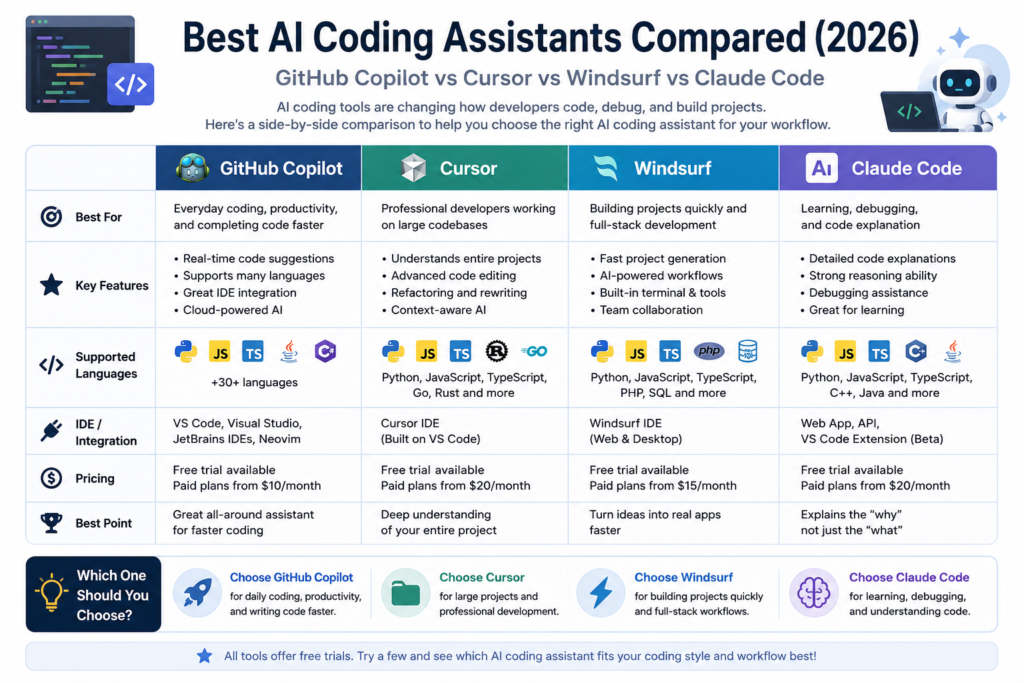
GitHub Copilot, Cursor, Windsurf, and Claude Code are among the most talked-about AI coding tools in 2026, yet each one serves a different type of user.
In this guide, we’ll compare their strengths, ideal use cases, and help you find the best AI coding assistant for your workflow.
What Makes a Good AI Coding Assistant?
Not every coding assistant is designed the same way.
Before choosing one, think about how you plan to use it.
Important factors include:
- Code quality
- Bug detection
- Speed
- IDE integration
- Project understanding
- Ease of use
- Pricing
A beginner learning Python has different needs than an experienced software engineer managing a large codebase.
GitHub Copilot
Best For
- Everyday coding
- Visual Studio Code
- Productivity
- Software development
GitHub Copilot is one of the most widely used AI coding assistants.
It integrates directly into popular code editors and provides real-time suggestions as you write.
Many developers rely on it for routine coding tasks because it helps reduce repetitive work while keeping them focused.
Strengths
- Excellent IDE integration
- Fast code suggestions
- Supports many programming languages
- Beginner-friendly
Cursor
Best For
- Professional developers
- Large projects
- Refactoring
- AI-assisted programming
Cursor has become a favorite among developers who want AI deeply integrated into their workflow.
Instead of simply completing lines of code, Cursor understands larger codebases and can explain, edit, or rewrite entire files.
Many users appreciate its ability to understand project context rather than isolated code snippets.
Strengths
- Strong project awareness
- Excellent code editing
- Intelligent refactoring
- Modern interface
Windsurf
Best For
- Full-stack development
- Rapid prototyping
- AI-powered coding workflows
- Team projects
Windsurf focuses on helping developers move from ideas to working applications more quickly.
Its AI features are designed to assist throughout the development process, from planning and coding to debugging.
For developers who frequently start new projects, Windsurf offers a streamlined experience.
Strengths
- Fast project generation
- Clean workflow
- Helpful AI suggestions
- Good collaboration features
Claude Code
Best For
- Code explanation
- Learning programming
- Debugging
- Complex reasoning
Claude Code stands out because of its reasoning ability.
Rather than simply generating code, it often provides detailed explanations of why something works or why a bug occurs.
It’s especially useful for developers who want to understand the code instead of simply copying it.
Strengths
- Excellent explanations
- Strong debugging support
- Great for learning
- Clear documentation assistance
Which AI Coding Assistant Should You Choose?
The best choice depends on your goals.
| If you want to… | Recommended Tool |
|---|---|
| Write code faster | GitHub Copilot |
| Work on large projects | Cursor |
| Build projects quickly | Windsurf |
| Learn programming | Claude Code |
| Debug difficult problems | Claude Code |
| Improve everyday productivity | GitHub Copilot |
Many professional developers combine multiple tools.
For example, they might write code with GitHub Copilot, edit large projects using Cursor, and ask Claude Code to explain complex logic or troubleshoot difficult bugs.
Each assistant brings something different to the development process.
Are Free Versions Enough?
Most AI coding assistants offer either a free tier or a trial period.
For students and hobby developers, these plans are often enough to explore the features and improve everyday coding.
Professional developers working on commercial projects may eventually benefit from paid plans with higher usage limits and more advanced capabilities.
AI Won’t Replace Good Programming Skills
AI can generate code remarkably quickly, but it still depends on human judgment.
Understanding programming concepts, reviewing generated code, and testing applications remain essential.
The best developers use AI to eliminate repetitive work while continuing to make the important technical decisions themselves.
Think of AI as a coding partner—not a replacement for programming knowledge.
Final Thoughts
AI coding assistants have transformed the way software is built.
Whether you’re writing your first Python script or managing a large production application, there’s an AI assistant that can make development faster and more enjoyable.
If you’re looking for a reliable all-around assistant, GitHub Copilot remains an excellent choice.
If your work involves large codebases, Cursor offers impressive project awareness.
For rapid development, Windsurf provides an efficient workflow.
And if learning or debugging is your priority, Claude Code stands out with its thoughtful explanations.
The best approach is to experiment with a few tools and discover which one best complements your coding style.
In the next article, we’ll explore how students can use AI responsibly to study more efficiently without relying on it for every answer.
Next Reading: Best AI Tools for Students (2026): Study Smarter with Artificial Intelligence