What Actually Works, What Breaks, and What You Still Need to Know in 2026
An AI website builder can help someone create a functioning website without writing code—but building a website and running a reliable website are two very different achievements.
Imagine this.
You have an idea for a business.
Maybe it’s a small online store.
A booking website.
A portfolio.
A restaurant website.
Or a simple application that solves a problem you’ve been thinking about for years.
Five years ago, turning that idea into something real probably meant learning web development, hiring a developer, or wrestling with a website builder.
Today, you can describe what you want in ordinary language.
Build a modern website for a small coffee business. Include a homepage, product catalog, customer reviews, contact form, and mobile-friendly navigation.
And an AI tool may produce something remarkably close to a working website.
Within minutes, you could be looking at a homepage with attractive typography, responsive layouts, images, buttons, and navigation.
It feels like you’ve skipped the difficult part.
But have you?
The interesting question isn’t whether AI can generate a website. It’s whether you can actually operate what it creates.
The Website Looks Finished. Is It?
This is where I’d begin.
Suppose AI generates a beautiful online store.
The homepage looks professional.
Products appear in neat cards.
There’s a shopping cart icon.
The checkout button is perfectly positioned.
Everything looks convincing.
Now try purchasing something.
Does the cart actually work?
Can customers pay?
Where does the order go?
Does the business receive a notification?
What happens if payment fails?
Can the customer request a refund?
Is inventory updated?
What happens when someone enters an invalid address?
Suddenly, the attractive homepage becomes the least interesting part of the project.
A website is more than what appears on the screen.
And that’s where the gap between AI-generated design and production-ready software becomes important.
There Are Three Very Different Ways to Build a Website With AI
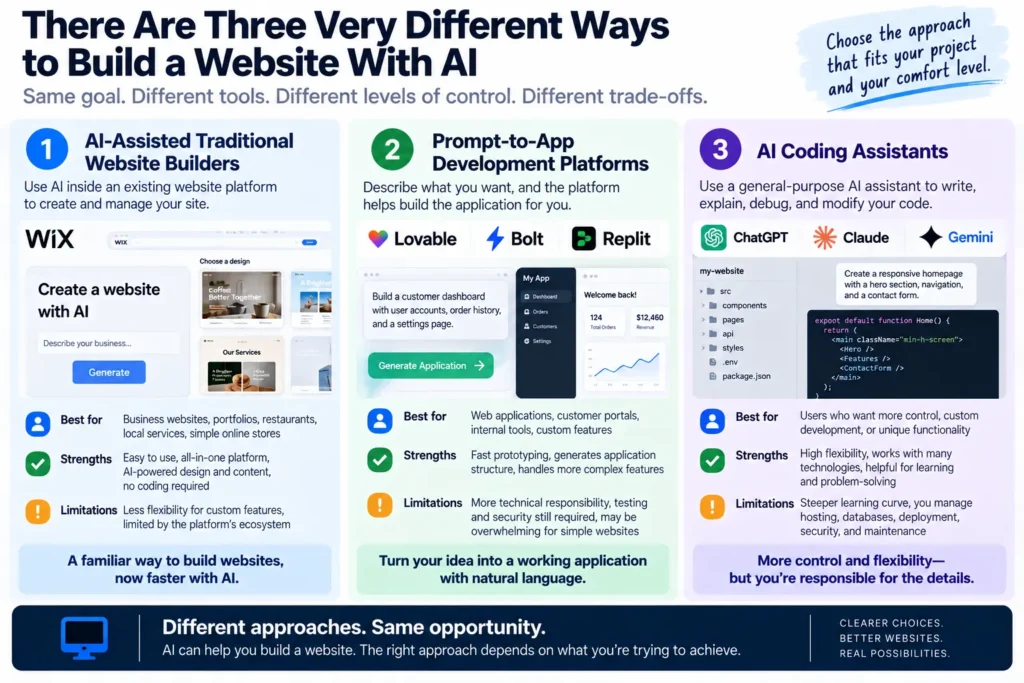
When people talk about AI website builders, they often combine several categories of tools that solve different problems.
Understanding the distinction can save you considerable time.
1. AI-Assisted Traditional Website Builders
These are platforms that already provide the infrastructure for building and operating websites.
AI helps generate:
- layouts,
- text,
- page structures,
- images,
- design suggestions,
- basic site configurations.
The underlying platform still handles much of the traditional website-building process.
Wix and similar services belong broadly in this category.
This approach is attractive when you want a familiar website-building environment and don’t need unusual functionality.
You’re using AI to accelerate a relatively established workflow.
2. Prompt-to-App Development Platforms
This is where tools such as Lovable, Bolt, and Replit become interesting.
Instead of choosing a template and modifying it, you describe the application you want.
The system helps create the underlying interface and application logic.
You might request:
Build a customer dashboard where users can create accounts, track orders, and download invoices.
The tool can help generate an application structure rather than simply designing a static page.
That’s a meaningful difference.
But it also introduces more technical responsibility.
Accounts need authentication.
Customer information needs protection.
Databases need reliable rules.
And applications need testing.
3. AI Coding Assistants
Then there’s another approach.
Use a general-purpose AI assistant or coding tool to help write, explain, debug, and modify the code.
This provides considerable flexibility.
But someone still needs to understand how the pieces fit together.
Hosting.
Domains.
Dependencies.
Databases.
Deployment.
Security.
Maintenance.
AI can help with all of those.
It doesn’t make them disappear.
The First Decision: Website or Web Application?
Before choosing a tool, I’d ask one question.
Are you building a website—or software that happens to run in a browser?
That distinction changes everything.
Consider a restaurant website.
It needs:
- opening hours,
- menus,
- photographs,
- location,
- contact information,
- perhaps a reservation link.
Now consider a restaurant reservation application.
It needs:
- availability management,
- customer accounts,
- booking rules,
- cancellations,
- notifications,
- duplicate-booking prevention,
- potentially payment handling.
Both live on the web.
But they’re fundamentally different engineering problems.
A basic website can often be built with relatively little custom code.
A reliable application needs much more than a good-looking interface.
This is why I wouldn’t choose an AI website builder until I understood which category my project belongs to.
What AI Website Builders Are Already Good At
There are several areas where AI can provide immediate value.
Getting Past the Blank Page
Starting is difficult.
What should the homepage contain?
Which sections belong above the fold?
How should navigation work?
Where should the call-to-action appear?
AI can turn a rough description into a concrete first draft.
That’s valuable because reacting to something is often easier than designing from nothing.
Creating Responsive Layouts
Modern websites need to work across different screen sizes.
AI-assisted tools can help generate responsive structures and styling.
But responsiveness still needs testing.
A page that looks excellent on a desktop can have broken navigation, cramped buttons, or awkward spacing on a phone.
Generating Repetitive Components
Suppose you need twelve product cards with the same structure.
Or a set of FAQ sections.
Or a consistent header and footer.
AI is useful for creating and modifying repeated components.
This is exactly the kind of mechanical work that benefits from automation.
Prototyping New Ideas
Perhaps the biggest advantage is speed.
You can move from:
I wonder if this idea would work.
to:
Here’s a working prototype. What do people think?
much faster than before.
That doesn’t prove the business is viable.
But it reduces the cost of exploring the idea.
The Five-Minute Website Illusion
Here’s a scenario worth examining.
You ask an AI builder to create a website.
Five minutes later, it looks impressive.
The temptation is to think:
The project is 90% finished.
Maybe.
But that depends on what you’re measuring.
If the goal was to create a visual prototype, you might be nearly finished.
If the goal was to launch a real business, you may have completed only the most visible part.
The remaining work could include:
- real content,
- functional forms,
- data storage,
- authentication,
- payment integration,
- accessibility,
- security,
- analytics,
- search visibility,
- backups,
- maintenance.
The danger is confusing visual completion with operational completion.
AI makes the first much faster.
The second still requires careful work.
The same problem appears in AI-generated presentations. An AI PowerPoint generator can produce impressive slides in minutes, but creating something accurate, editable, and ready for a real audience still requires human judgment and careful revision.
A Beautiful Website Can Be Completely Broken
Imagine a contact form.
Name.
Email.
Message.
Submit.
It looks perfect.
You type a message.
Click Submit.
A green notification appears:
Your message has been sent!
But where did the message go?
Was it saved?
Was an email actually delivered?
Or did the generated interface simply display a success message?
This is the kind of failure beginners may not notice.
The website appears to work because the interface behaves convincingly.
But the underlying process isn’t connected to anything.
That’s why I would never evaluate an AI-generated website by appearance alone.
A button isn’t a feature until the promised action actually happens.
The Six Tests Every AI Website Should Pass
Before publishing, I’d apply six basic tests.
1. Navigation Test
Can visitors reach every important page?
Do links go to the correct destinations?
Does mobile navigation work?
2. Functionality Test
Do forms, buttons, search, filters, and other interactive elements actually perform their intended actions?
3. Data Test
If information is submitted or changed, is it stored correctly?
Does it remain correct after refreshing the page?
4. Mobile Test
Does the website remain usable on a small screen?
Can people read, navigate, and complete important actions without frustration?
5. Failure Test
What happens when something goes wrong?
Invalid input.
Lost connection.
Failed payment.
Expired session.
Missing information.
A reliable website needs to handle failure, not just success.
6. Ownership Test
Can you export your work?
Access the code?
Move to another hosting provider?
Maintain the website if you stop paying for the builder?
This final question is frequently overlooked.
And it can become one of the most expensive mistakes.
The Hidden Cost of “Free” AI Website Building
Many people begin with a simple assumption.
If AI builds the website, I won’t have to pay a developer.
That may be true for some projects.
But development cost isn’t the only cost.
A website can involve:
- domain registration,
- hosting,
- AI generation credits,
- database services,
- file storage,
- email delivery,
- payment processing,
- third-party integrations,
- maintenance.
Not every project needs every service.
A simple portfolio may require very little ongoing infrastructure.
A customer-facing application may require considerably more.
And pricing models differ.
One platform might charge for generation usage.
Another might charge for hosting.
Another might charge based on users, database activity, or additional services.
Before committing, I’d ask:
What will this website cost when real people start using it?
That’s a better question than:
Can I build it for free?
The Ownership Problem Nobody Thinks About on Day One
Imagine spending three months building your website.
You finally like it.
Customers are arriving.
Everything works.
Then you discover that moving to another platform is difficult.
Maybe you can export some code but not the entire backend configuration.
Maybe the database requires migration.
Maybe authentication depends on a particular service.
Maybe the visual editor cannot be transferred.
Or perhaps you can move everything, but maintaining it elsewhere requires skills you don’t have.
None of this necessarily makes the original platform bad.
Convenience often involves trade-offs.
But those trade-offs should be understood before your business depends on the system.
I would investigate four things:
Code ownership: Can I access and export the underlying code?
Data portability: Can I retrieve my customer and business data?
Hosting flexibility: Can I run the application somewhere else?
Maintenance: Who fixes problems when the AI builder is no longer involved?
A website you can create easily but cannot maintain independently may become expensive later.
AI Can Write Code. Who Is Responsible for the Security?
This is where I’d become more conservative.
Suppose your website allows customers to create accounts.
Now you’re handling user information.
Perhaps:
- names,
- email addresses,
- order histories,
- addresses,
- account credentials.
A visually correct login page doesn’t guarantee secure authentication.
A functioning database doesn’t guarantee appropriate access controls.
A working checkout doesn’t guarantee secure payment handling.
And code that runs successfully isn’t necessarily safe.
For anything involving real customer data, I would want to verify:
- authentication,
- authorization,
- server-side validation,
- secret management,
- database access rules,
- dependency security,
- backup and recovery.
This is where professional review may be justified, even if AI generated most of the application.
AI can reduce the effort required to create software. It doesn’t transfer responsibility away from the person operating it.
The Prompt That Creates More Problems Than It Solves
There’s a common beginner approach:
Build me a complete professional website with every feature I need.
The AI produces a large result.
Then something breaks.
You ask it to fix the problem.
It changes several other things.
You ask it to restore them.
Another feature breaks.
Now you’re trapped in a loop of increasingly complicated instructions.
This isn’t necessarily because the AI is bad.
It’s often because the project has no clear specification.
The better approach is to build incrementally.
Start with the smallest useful version.
Test it.
Then add one feature.
Test again.
This is less spectacular than generating an entire application in one prompt.
It’s also much easier to control.
The Website Specification I’d Write Before Using AI
Before opening a builder, I’d create a short project brief.
Not fifty pages.
Just enough to define the actual job.
Purpose
What is this website supposed to accomplish?
Audience
Who will use it?
Core Pages
Which pages are genuinely necessary?
Essential Functions
What must actually work?
Data
What information will the website collect or store?
Integrations
Does it need payments, email, bookings, analytics, or external services?
Design Direction
What should it feel like?
Launch Criteria
How will I know it’s ready?
This may sound like extra work.
But five minutes spent clarifying requirements can prevent hours of AI-generated revisions.
My First Prompt Would Be a Plan, Not a Website
Instead of asking AI to generate everything immediately, I’d begin with:
I want to build a website for a small business. Before generating any code or layouts, help me define the minimum viable version. Identify the essential pages, necessary features, data requirements, potential security concerns, and what can safely wait until after launch. Ask me about anything that would materially change the architecture.
Then I’d review the plan.
Remove unnecessary features.
Clarify the uncertain parts.
Only then begin generating.
The goal isn’t to make the prompt more complicated.
It’s to make the project less ambiguous.
The Real Advantage of AI Website Building
I don’t think the biggest breakthrough is that AI can create attractive websites.
Traditional website builders could already do that.
The more interesting change is that people can increasingly describe behavior, not just appearance.
Not simply:
Put a blue button here.
But:
When a customer submits this form, validate the information, save the request, and send a confirmation.
That moves us from visual design toward software creation.
It’s a much more powerful capability.
And a much more demanding one.
Because the moment a website starts doing real work, reliability becomes part of the product.
A beautiful page can be forgiven for an imperfect margin.
A booking system cannot be forgiven for losing reservations.
That’s the standard AI-generated websites eventually have to meet.
글쓰기
This is why keeping human judgment in an AI workflow matters. AI can generate the interface and help implement features, but people still need to define what success means, evaluate the results, and decide whether the website is ready for real users.
The Question I’d Ask Before Publishing Anything
Forget the homepage for a moment.
Forget the animations.
Forget whether the design looks like a professional agency created it.
Ask:
If a real customer uses this website tomorrow, what could go wrong?
Then test those situations.
What if they forget their password?
What if they submit a form twice?
What if their payment fails?
What if they use an older phone?
What if they enter information you didn’t expect?
What if the website becomes unavailable?
Those questions aren’t glamorous.
They’re also what separates a convincing demo from something people can depend on.
And that’s where AI website building becomes a serious discipline rather than a five-minute trick.
Lovable vs Bolt vs Replit vs Wix vs WordPress: Which Should You Actually Choose?
The AI website builder market has become confusing for one simple reason.
Different products promise remarkably similar outcomes.
Build a website with AI.
Create an app without coding.
Launch your idea in minutes.
Describe what you want and watch it appear.
But those promises hide But those promises hide important differences.
Some platforms are designed primarily to help you publish websites. Others are closer to AI-assisted software development environments. And some combine traditional content management with AI-powered design and editing.
The question isn’t which homepage looks most impressive.
It’s which environment makes sense for the project you intend to maintain.
Here’s how I’d approach the decision.
Lovable: When You Want to Turn an Idea Into an Application
Lovable is particularly interesting for people who want to describe a web application in natural language and begin building it without starting from a traditional code editor.
Imagine you want a customer portal.
Users should be able to register, sign in, view information, and interact with a dashboard.
That’s a different task from publishing a five-page company website.
A prompt-driven application builder can help you move from an idea to a functional prototype quickly.
But the complexity doesn’t disappear.
Authentication still needs to work correctly. Data permissions still matter. External services still need configuration. And generated application behavior still needs testing.
I’d consider Lovable when the project involves custom application behavior rather than primarily publishing articles or marketing pages.
The important question is whether the resulting application can be understood, maintained, and secured as it grows.
Bolt: When Rapid Web Prototyping Matters
Bolt belongs in the category of tools that make browser-based application development more accessible through AI assistance.
It’s particularly interesting when you want to generate, modify, and preview a web project through an iterative development process.
For example, imagine building a simple project management dashboard.
You might begin with a description of the interface, then add task creation, status filtering, and user interactions.
That iterative workflow can be faster than setting up a traditional development environment manually.
But speed also makes it easy to accumulate unnecessary complexity.
Each new feature can introduce dependencies, state-management problems, or interactions that weren’t part of the original plan.
I’d use Bolt for rapid prototyping and experimentation, while being deliberate about testing and understanding the generated project before treating it as production-ready.
Replit: When the Project May Grow Beyond a Simple Website
Replit approaches the problem from a broader software development perspective.
That makes it interesting when the website is only one part of a larger application.
Perhaps you’re building:
- a customer dashboard,
- a custom internal tool,
- a small software product,
- a data-driven application,
- a service that connects to external APIs.
For these projects, the ability to work with application code, development tools, and deployment workflows can matter more than how quickly the first homepage appears.
The trade-off is that more flexibility can also mean more technical responsibility.
You may eventually need to understand application architecture, debugging, databases, dependencies, and operational costs.
AI can help you work through those subjects.
But it shouldn’t be mistaken for a guarantee that the resulting system will maintain itself.
Wix: When You Need a Business Website, Not a Software Project
Now imagine something simpler.
You’re opening a local business.
You need a homepage, services, photographs, contact details, and perhaps booking or commerce features supported by the platform.
You don’t necessarily need custom application architecture.
You need a website that customers can find and use.
That’s where an established website-building platform such as Wix can be a more appropriate starting point.
AI-assisted creation can accelerate design and content preparation, while the platform provides an existing environment for managing the website.
This reduces the need to build common website infrastructure from scratch.
The trade-off is flexibility.
If your business eventually requires unusual workflows or deeply customized application behavior, you may encounter limitations.
But that’s not necessarily a problem.
For many small businesses, simplicity is an advantage.
The best tool isn’t the one that lets you build the most complicated website. It’s the one that lets you operate the website you actually need.
WordPress: When Content Ownership and Publishing Matter
WordPress deserves a separate discussion because it solves a different long-term problem.
Suppose you’re building a publication.
A blog.
A magazine.
A travel guide.
A specialized information website.
Your most valuable assets may eventually be hundreds of articles, images, categories, internal links, and search rankings.
Now content management becomes central.
You need to publish regularly, update existing articles, manage navigation, organize archives, and maintain a coherent information structure.
WordPress has a mature ecosystem for these tasks.
AI can assist with drafting, design, coding, content organization, and maintenance, but the underlying content management system remains important.
The trade-off is operational responsibility.
Depending on your hosting arrangement and plugins, you may need to manage updates, compatibility, performance, security, and backups.
I’d lean toward WordPress when the long-term business is primarily built around content and publishing rather than custom application functionality.
The Decision Matrix I’d Use
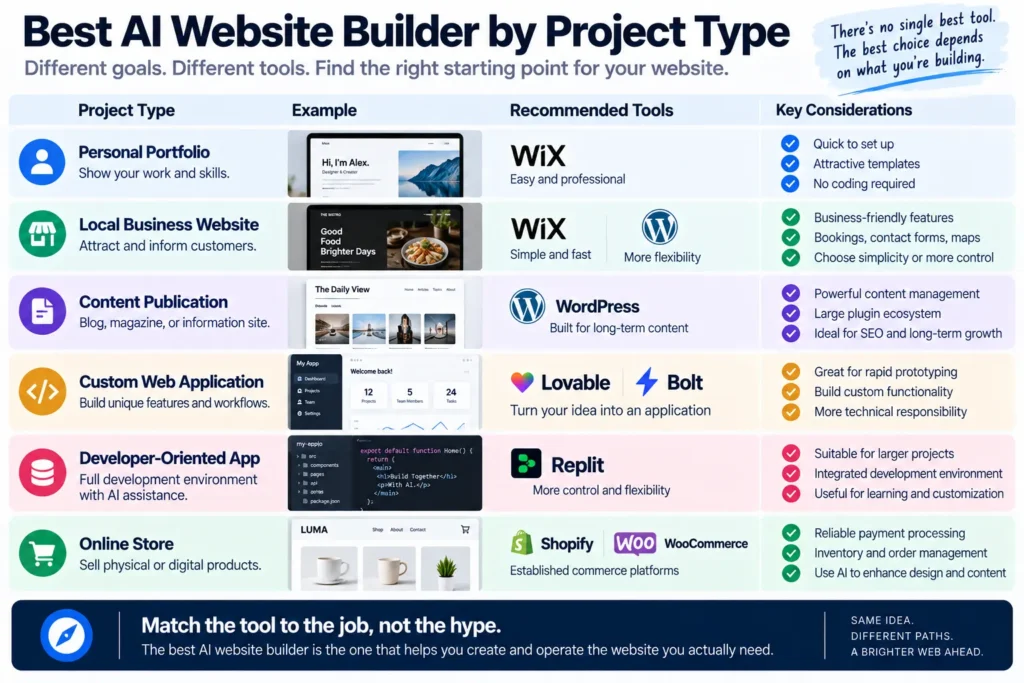
Choosing the right AI website builder depends less on which tool generates the most impressive demo and more on the kind of website you need to operate.
Instead of assigning arbitrary scores, I’d start with the project.
| What you’re building | Where I’d start |
|---|---|
| Personal portfolio | Wix or a simple site builder |
| Local business website | Wix or WordPress |
| Content-heavy publication | WordPress |
| Custom application prototype | Lovable or Bolt |
| Developer-oriented web application | Replit |
| Internal business dashboard | Lovable, Bolt, or Replit |
| Standard online store | Established commerce platform |
| Highly customized software product | AI-assisted development with technical review |
These are starting points, not permanent rankings.
A product’s capabilities, pricing, export options, and integrations can change. The exact choice should be verified against the current product and plan before committing.
What matters is matching the platform to the job.
Can AI Build a Real Online Store?
Yes, but this is where I would be particularly careful about what the word build means.
Imagine you want to sell physical products.
The visible website may need:
- product pages,
- categories,
- images,
- prices,
- cart,
- checkout.
AI can help generate many of these components.
But the business also needs reliable processes for:
- payment,
- orders,
- inventory,
- shipping,
- returns,
- taxes,
- customer communication,
- privacy and security.
These are operational systems.
A beautifully generated checkout page doesn’t mean you have a functioning commerce business.
Why I Wouldn’t Build Checkout From Scratch
For a normal online store, I would generally begin with an established commerce system.
Depending on the project, that could mean Shopify, WooCommerce, or another suitable platform.
Then use AI to improve the parts that benefit from customization.
Product presentation.
Landing pages.
Customer information.
Design variations.
Content.
Workflow automation.
That approach often provides a more practical balance between flexibility and reliability than generating an entire commerce system from scratch.
The payment process is not where I’d want an experimental implementation.
What About Booking Websites?
Booking systems introduce a different problem.
A basic website might display a calendar.
A real booking system must manage availability.
Imagine two customers selecting the last available appointment at nearly the same time.
Both click Confirm.
What happens?
If the system accepts both, the interface may look perfect while the business has a serious problem.
Now add cancellations, rescheduling, time zones, notifications, deposits, and no-shows.
The complexity grows quickly.
For standard appointment booking, I’d consider an established booking service before generating custom scheduling logic.
Custom development becomes more attractive when the business has genuinely unusual requirements that existing products cannot handle.
Don’t build custom infrastructure simply because AI makes it possible. Build it when customization creates real value.
The Portfolio Website Is a Much Better First Project
If you’ve never built a website before, a portfolio is an excellent starting point.
Why?
Because it allows you to learn the process without immediately handling complex business operations.
You can practice:
- page structure,
- responsive design,
- navigation,
- images,
- typography,
- contact information,
- deployment,
- domain configuration.
You can also test different AI workflows.
Start with a simple description.
Generate the first version.
Replace generic content with real information.
Improve the layout.
Test the mobile version.
Publish.
Then make changes.
The goal isn’t to create the most impressive website possible.
It’s to understand the complete process from idea to a maintained, published site.
A Practical AI Website Workflow
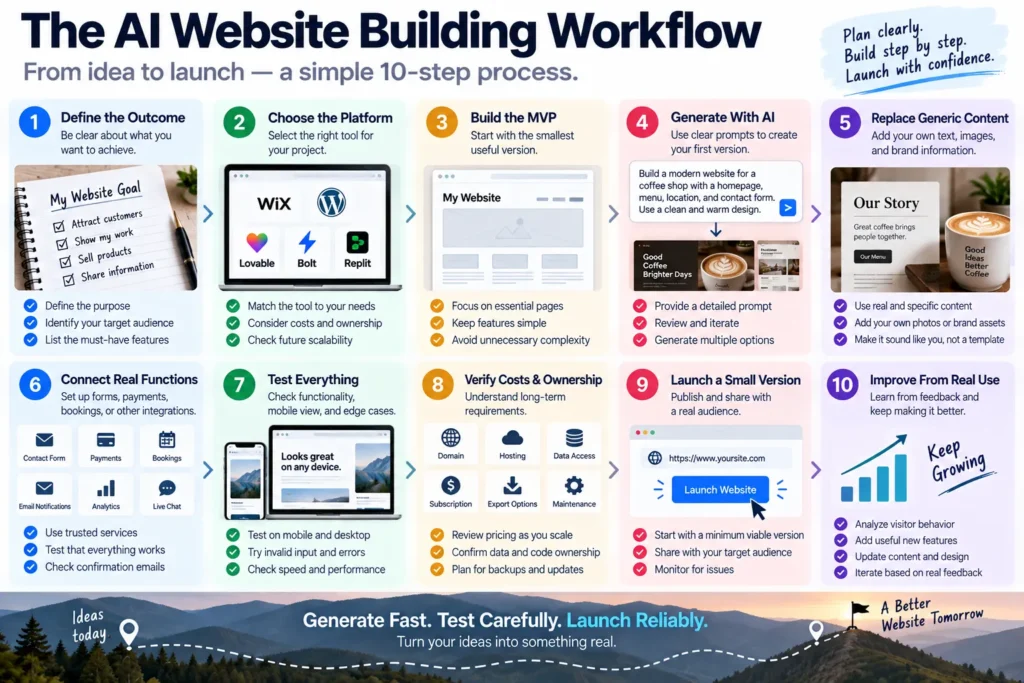
Here’s how I’d build a website with AI without losing control of the project.
Step 1: Define the Outcome
Write one sentence explaining what the website should accomplish.
For example:
Help potential customers understand my services and request a consultation.
That statement becomes the filter for every feature.
Step 2: Choose the Simplest Suitable Platform
Don’t select the most technically impressive builder.
Select the one that fits the project’s actual requirements.
A portfolio doesn’t need a complex application stack.
A custom customer portal may.
Step 3: Build the Minimum Useful Version
Start with the essential pages and functions.
Don’t add dashboards, animations, chatbots, accounts, or elaborate integrations unless they solve a real problem.
Step 4: Generate the First Draft
Now use AI.
Provide:
- the audience,
- the website purpose,
- the required pages,
- the essential functions,
- the visual direction.
Ask for a coherent first version rather than an endless collection of features.
Step 5: Replace Generic Content
This is important.
AI-generated websites often contain polished but generic language.
We deliver innovative solutions tailored to your needs.
That sentence could belong to almost any company.
Replace it with specific information.
What do you actually provide?
Who is it for?
What makes the service useful?
Why should someone trust you?
The website becomes valuable when it stops sounding interchangeable.
Step 6: Connect Real Functions
Make sure forms, bookings, payments, email notifications, and other features are connected to real services.
Don’t mistake visual feedback for successful execution.
Step 7: Test the Failure Cases
Submit invalid information.
Use a phone.
Refresh the page.
Try broken links.
Test error messages.
Check what happens when a service is unavailable.
For commerce and account-based applications, use appropriate test environments and review security-sensitive behavior.
Step 8: Verify Ownership and Costs
Before launch, understand:
- hosting,
- subscriptions,
- data access,
- backups,
- export options,
- ongoing maintenance.
Step 9: Launch a Small Version
Don’t wait for perfection.
But don’t publish something unreliable either.
Launch once the essential functions work and the important risks have been addressed.
Step 10: Improve From Real Use
Now observe what visitors actually do.
Which pages matter?
Where do they leave?
Which forms fail?
What questions do they ask?
Which features go unused?
Real behavior should guide the next version.
Not another random AI-generated idea.
The Hidden SEO Problem With AI Websites
An AI website builder can produce an attractive homepage without necessarily producing a strong search experience.
Search visibility depends on much more than appearance.
For example:
- Can search engines access the important pages?
- Are page titles and descriptions meaningful?
- Does the site have a clear content hierarchy?
- Are important pages connected through internal links?
- Does the site perform well on mobile?
- Is the content useful and original?
- Are there duplicate or empty pages?
A website can look professional and still be difficult for search engines to understand.
For a content-driven business, this matters enormously.
AI-Generated Content Isn’t Automatically Useful Content
There’s another temptation.
Once AI builds the website, why not ask it to generate fifty articles?
Because publishing volume doesn’t establish value.
A useful article needs a reason to exist.
It should answer a real question, provide reliable information, and offer something worth reading.
If every page is generic, the website may become larger without becoming better.
AI should help you publish useful content.
Not manufacture pages simply to make the site look complete.
Accessibility Is Not Optional Design Polish
Another issue that can disappear behind an attractive layout is accessibility.
Can visitors navigate with a keyboard?
Do buttons have meaningful labels?
Can screen readers understand the page structure?
Is text readable against the background?
Do form errors explain what needs correcting?
Can users operate important functions without relying entirely on color or animation?
AI can assist with accessibility improvements, but generated code should still be tested.
A visually polished website isn’t automatically accessible.
And accessibility isn’t merely a technical checkbox.
It’s part of making the website usable by real people.
The Maintenance Test
Imagine the website is six months old.
A dependency needs updating.
A form stops sending notifications.
A plugin conflicts with another component.
A customer reports an error.
A payment integration changes.
Who fixes it?
This is the question I would ask before choosing a platform.
If you’re comfortable working with code, a flexible development environment may be attractive.
If you’re not, a managed website platform may be easier to maintain.
Neither approach is universally superior.
But maintenance should influence the decision from the beginning.
The easiest website to generate isn’t always the easiest website to own.
The Real Cost: Time to a Reliable Website
AI website builders are frequently compared by generation speed.
One creates a page in thirty seconds.
Another takes two minutes.
Another produces a more elaborate design.
But I would measure something else.
Time to a Reliable Website.
That includes:
- initial generation,
- content replacement,
- functionality,
- testing,
- revisions,
- deployment,
- fixes.
Imagine Tool A generates a beautiful website in five minutes, but you spend eight hours repairing forms and layouts.
Tool B takes thirty minutes to produce a simpler site, but the essential functions work within another hour.
Which one was faster?
The generation timer doesn’t answer that.
The total production process does.
This is the same principle that applies to AI video, music, and presentations.
Generated output is not the same as usable output.
My AI Website Builder Scorecard
If I were comparing platforms for a real project, I’d evaluate eight factors.
1. Time to First Useful Version
How quickly can I create something worth testing?
2. Functional Reliability
Do the promised features actually work?
3. Editing Control
Can I make precise changes without accidentally breaking unrelated components?
4. Ownership and Portability
Can I access my code, data, and assets?
5. Security
Does the platform support appropriate safeguards for the project’s risk level?
6. Operating Costs
What happens to costs as the website grows?
7. Maintenance
Can I keep the website working without rebuilding it?
8. Time to Reliable Launch
How much total effort does it take before real visitors can safely use it?
That last metric matters most.
A fast demo is impressive.
A reliable launch is valuable.
Who Should Use an AI Website Builder?
I’d divide the answer into four groups.
Beginners Building Simple Websites
Yes.
AI-assisted site builders can be an excellent starting point.
Focus on clear content, usable design, and understanding the publishing process.
Small Businesses
Yes, especially when the website uses established services for essential functions.
Avoid unnecessary custom development.
Entrepreneurs Testing Software Ideas
Absolutely worth exploring.
AI-assisted application builders can reduce the cost of prototyping.
But validate demand before investing heavily in complicated architecture.
Businesses Handling Sensitive Data or Critical Operations
Use more caution.
AI can accelerate development, but security, reliability, compliance, and professional review may be necessary.
The higher the consequence of failure, the stronger the verification should be.
What I Would Never Do
I wouldn’t build a custom payment system just to avoid using an established provider.
I wouldn’t launch an account-based application without testing access permissions.
I wouldn’t assume generated code is secure because it runs.
I wouldn’t choose a platform without understanding export and ownership.
I wouldn’t generate fifty pages of generic content simply to make the site look bigger.
I wouldn’t confuse a successful preview with a successful deployment.
And I wouldn’t keep adding features before the essential ones work.
These aren’t arguments against AI website building.
They’re the habits that make AI website building useful rather than fragile.
The AI Website Launch Checklist
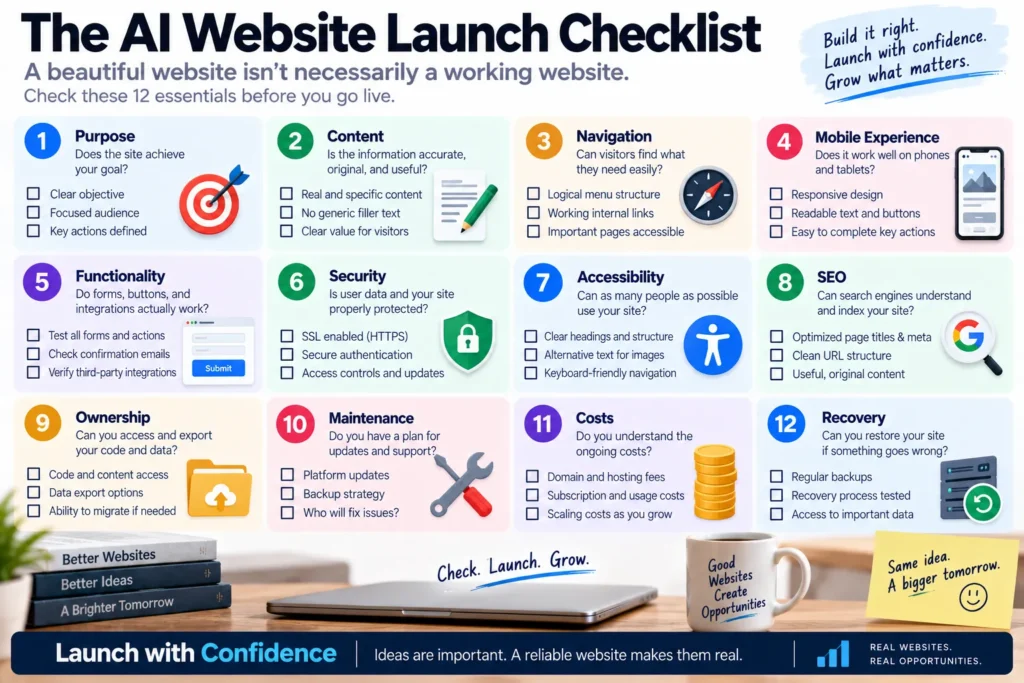
Before publishing, I’d want clear answers to the following questions.
Purpose: Does the website solve the problem it was created to solve?
Content: Is the information accurate, specific, and useful?
Navigation: Can visitors find important pages easily?
Mobile: Can someone complete the main task on a phone?
Functionality: Do forms, buttons, and integrations actually work?
Security: Are authentication, permissions, and sensitive information handled appropriately?
Accessibility: Can people with different abilities use the essential functions?
SEO: Can search engines access and understand the important pages?
Ownership: Can I retrieve my code, content, and business data?
Maintenance: Do I know who will handle updates and problems?
Costs: Do I understand what operating the website will cost?
Recovery: Can I restore the website and its data if something goes wrong?
If you can’t answer these questions, the website may not be ready—even if the design looks finished.
Final Thoughts
So, can AI build a website without coding?
Yes.
And for many projects, it can make the process dramatically easier.
You can describe an idea.
Generate a layout.
Create pages.
Build interactive components.
Prototype applications.
Modify designs.
Explore alternatives.
Publish faster.
That’s a meaningful change.
But the more important question is whether AI can help you build something that people can actually depend on.
A website isn’t finished when the homepage looks beautiful.
It’s finished when the important things work.
When customers can contact you.
When orders reach the business.
When bookings don’t disappear.
When information remains accurate.
When the site works on a phone.
When you can fix problems.
When you understand what you’re paying for.
And when the website continues working after the excitement of the first generation has faded.
I think AI website building will make creating software accessible to far more people.
That’s exciting.
But it also means more people will encounter problems that developers have been solving for decades.
Security.
Reliability.
Architecture.
Testing.
Maintenance.
Ownership.
AI doesn’t make those disciplines irrelevant.
It makes them accessible—and therefore more important for beginners to understand.
So don’t judge an AI website builder by the first five minutes.
Judge it by what happens after the website goes live.
The real achievement isn’t generating a website without coding.
It’s building something useful, reliable, and maintainable without having to become a full-time developer.
Frequently Asked Questions
Can AI build a website without coding?
Yes. AI-assisted website builders and application development platforms can generate layouts, pages, content, and certain functional features from natural-language instructions. The amount of technical work required depends on the project’s complexity.
What is the best AI website builder in 2026?
There is no universal winner. Traditional website builders are often suitable for portfolios and business websites, while prompt-to-app platforms are more relevant for custom application prototypes. The best choice depends on functionality, ownership, cost, maintenance, and the type of website you’re creating.
Can ChatGPT build a website?
ChatGPT can help plan a website, write and explain code, create content, debug problems, and guide deployment. Depending on the tools and workflows available, it may also help produce website files or working prototypes. However, hosting, domain configuration, testing, security, and ongoing maintenance still need to be addressed.
Is Lovable better than Bolt for building websites?
Both can help create web applications through natural-language instructions, but the better choice depends on your project, preferred development workflow, integrations, editing requirements, and deployment needs. Test the same small project in both environments before committing to a larger application.
Is Replit suitable for beginners?
Replit can make software development more accessible through AI assistance and an integrated development environment. Beginners can use it to experiment with applications, but more complex projects may still require an understanding of databases, security, debugging, and deployment.
Is WordPress better than an AI website builder?
WordPress is often a strong choice for content-heavy websites, blogs, and publications that require ongoing content management. AI-first builders may be more attractive for rapidly prototyping custom applications. The right choice depends on what you need to publish, operate, and maintain.
Can AI create an online store?
Yes, AI can help generate storefront layouts, product pages, descriptions, and customized features. For actual transactions, an established e-commerce platform or trusted payment provider is generally preferable to building payment infrastructure from scratch.
Can AI-built websites rank on Google?
Yes. Using AI to create a website does not automatically prevent it from appearing in search results. Search visibility depends on factors including crawlability, useful content, site structure, technical performance, and overall quality. AI-generated pages still need accurate information and meaningful value for visitors.
Are AI website builders free?
Some platforms offer free plans, trials, or limited usage, but publishing and operating a website may involve costs for domains, hosting, AI credits, databases, storage, integrations, and additional features. Always check the current pricing and limitations before selecting a platform.
Are AI-generated websites secure?
Not automatically. A website can function correctly while containing security weaknesses. Projects involving user accounts, payments, or sensitive information require appropriate authentication, access controls, validation, secret management, updates, and testing.
Can I move an AI-generated website to another hosting provider?
It depends on the platform and how the website was built. Some environments support code export and independent deployment, while others rely more heavily on proprietary infrastructure. Check code ownership, data portability, backend dependencies, and migration options before committing.
Do I still need a developer if AI builds my website?
Not necessarily for a simple portfolio, informational website, or basic business site. More complex applications involving sensitive data, custom integrations, critical transactions, or substantial traffic may benefit from professional development, security review, and ongoing technical support.