Artificial intelligence has changed the way people write.
Whether you’re creating blog posts, writing emails, studying for exams, or brainstorming new ideas, AI writing assistants can save hours of work.
The problem is that there isn’t just one option anymore.
ChatGPT, Claude, Gemini, Microsoft Copilot, and several other platforms all promise to help you write faster and better.
But which one is actually right for you?
The answer depends on what you’re trying to accomplish.
Some AI tools are better at creative writing, while others excel at research, long documents, or productivity.
In this guide, we’ll compare today’s most popular AI writing assistants and help you decide which one fits your workflow.
What Makes a Good AI Writing Tool?
Not every writing assistant is built for the same purpose.
When comparing AI writing tools, consider these questions:
- Does it write naturally?
- Can it handle long documents?
- Is the information reliable?
- Does it understand context well?
- Is the free version useful?
- How easy is it to use?
The best AI isn’t always the one with the most features.
It’s the one that helps you finish your work more efficiently.
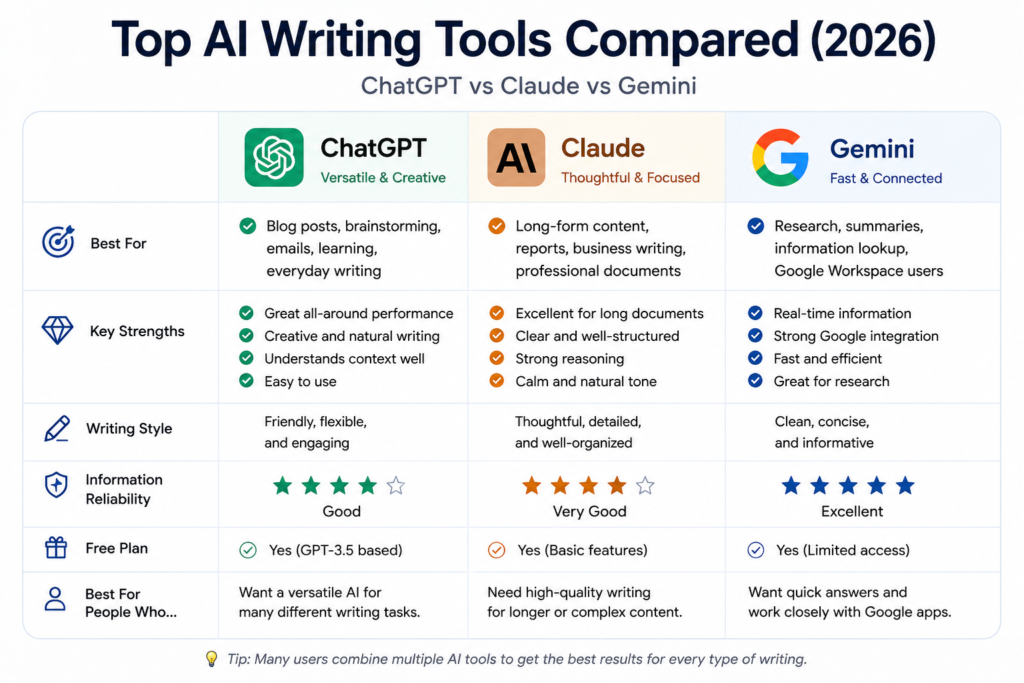
ChatGPT
Best For
- Blog writing
- Brainstorming
- Email drafts
- Learning
- General productivity
ChatGPT is one of the most versatile AI assistants available today.
It performs well across a wide range of tasks, making it an excellent choice for beginners and experienced users alike.
Its biggest strength is flexibility.
Whether you’re writing a social media post or organizing complex ideas, it adapts well to different writing styles.
Strengths
- Easy to use
- Excellent all-around performance
- Great for creative writing
- Strong prompt understanding
Claude
Best For
- Long-form writing
- Reports
- Business documents
- Professional communication
Claude has built a reputation for producing calm, natural, and well-structured writing.
Many users prefer it for longer articles because it tends to stay organized even with complex topics.
If your work involves detailed documents, Claude is an excellent option.
Strengths
- Natural writing style
- Excellent with long documents
- Strong reasoning
- Professional tone
Google Gemini
Best For
- Research
- Google Workspace
- Productivity
- Everyday questions
Gemini works especially well if you already rely on Google’s services.
Its integration with Google products makes it convenient for students and office workers.
It’s particularly useful when gathering information or organizing research.
Strengths
- Fast responses
- Strong Google integration
- Helpful research assistant
- Easy to access
Microsoft Copilot
Best For
- Office work
- Microsoft 365
- Windows users
- Business productivity
Copilot focuses heavily on improving productivity inside Microsoft’s ecosystem.
If you spend much of your day in Word, Excel, Outlook, or Teams, Copilot can become a valuable assistant.
Strengths
- Excellent Office integration
- Saves time on repetitive work
- Business-friendly
- Familiar interface
Perplexity AI
Best For
- Research
- Fact-checking
- Source discovery
- Academic work
Perplexity approaches AI differently.
Instead of simply generating answers, it often includes references and links to supporting information.
That makes it especially useful when accuracy matters.
Strengths
- Source citations
- Reliable research
- Fast information gathering
- Clean interface
Which AI Writing Tool Is Best?
There isn’t a single winner for everyone.
Each platform has its own strengths.
| If you want to… | Recommended Tool |
|---|---|
| Write blog posts | ChatGPT |
| Create long reports | Claude |
| Research information | Perplexity AI |
| Use Google apps | Gemini |
| Work in Microsoft Office | Copilot |
Many experienced users actually combine multiple AI tools depending on the task.
For example, they might research with Perplexity, draft with ChatGPT, polish with Claude, and finalize documents using Copilot.
Free vs Paid Plans
Most AI writing platforms offer free access.
If you’re just getting started, there’s usually no need to pay immediately.
Try several tools first.
Once you discover which one fits your workflow, upgrading becomes a much easier decision.
The free versions are more than capable of handling everyday writing for most people.
Final Thoughts
AI writing tools continue to improve at an incredible pace.
The “best” platform isn’t necessarily the newest one or the one with the most features.
It’s the one that helps you write more clearly, work more efficiently, and enjoy the process.
If you’re new to AI writing, start with ChatGPT or Claude.
As your needs grow, you’ll naturally discover which combination of tools works best for you.
In the next article, we’ll compare today’s leading AI image generators and explore which platform creates the best artwork, illustrations, and realistic images.
Next Reading: Best AI Image Generators Compared (2026): Midjourney vs DALL·E vs Flux vs Leonardo AI