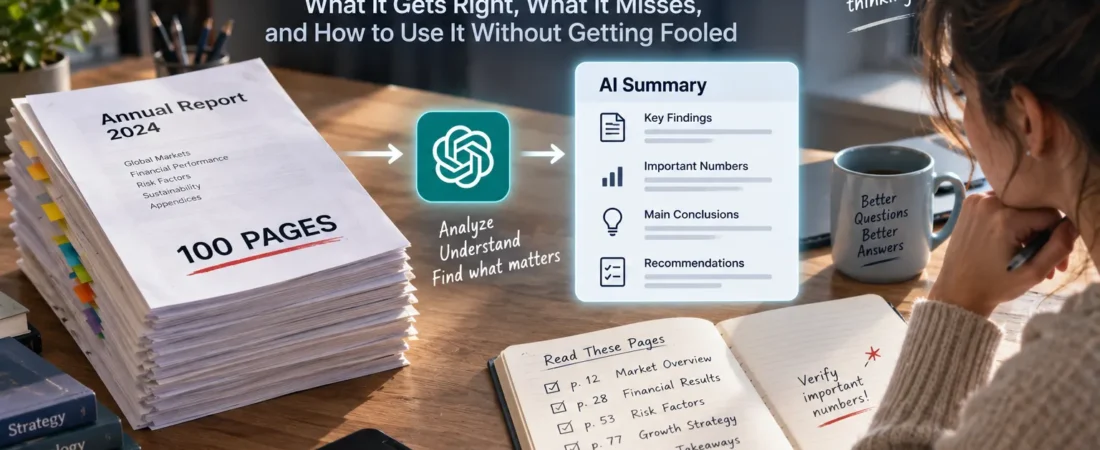
What It Gets Right, What It Misses, and How to Use It Without Getting Fooled
AI PDF analysis can turn a 100-page report into a useful summary in minutes—but uploading a document and asking “What does this say?” is also one of the easiest ways to become confidently misinformed.
The workflow seems almost magical.
Download a report.
Upload it to an AI assistant.
Type:
Summarize this.
Seconds later, you have:
- key findings,
- important numbers,
- conclusions,
- recommendations.
A document that might have taken two hours to read now takes two minutes.
So why read the PDF at all?
Because summarizing a document and understanding a document are not the same thing.
And once the document becomes important, that difference matters.
A 100-Page PDF Is Not Really One Thing
Imagine three documents.
The first is a 100-page corporate annual report.
The second is a 100-page academic paper collection.
The third is a 100-page technical manual.
They’re all PDFs.
But the reading task is completely different.
An annual report may require you to connect:
- financial tables,
- management commentary,
- footnotes,
- risk disclosures.
A research document may require you to distinguish:
- hypothesis,
- methodology,
- results,
- limitations,
- citations.
A technical manual may depend on:
- diagrams,
- warnings,
- specifications,
- procedures,
- cross-references.
So asking:
Can AI read PDFs?
isn’t specific enough.
The better question is:
Can AI extract the type of understanding I need from this particular document?
AI Is Extremely Good at Orientation
This is where I would use it immediately.
Suppose someone sends you a 137-page industry report.
Don’t begin on page 1.
Ask AI:
What is this document trying to accomplish?
Then:
Give me the structure of the document and explain what each major section contributes.
Then:
Which five sections are most relevant if I care specifically about European market growth?
Now you have a map.
That’s enormously useful.
AI can reduce the cost of finding your way through unfamiliar information.
Instead of reading 137 pages sequentially, you can identify the 25 pages that deserve close attention.
That’s not replacing reading.
That’s prioritizing reading.
The First Mistake: Asking for “A Summary”
“Summarize this PDF” sounds reasonable.
It’s also surprisingly vague.
What should survive the summary?
Numbers?
Arguments?
Risks?
Contradictions?
Recommendations?
Methodology?
A 500-word summary can’t preserve everything.
Something must disappear.
And unless you specify what matters, the AI decides what gets removed.
That’s why I prefer targeted summaries.
Instead of:
Summarize this report.
Try:
Summarize the report for someone deciding whether to invest in this industry. Preserve the major market estimates, assumptions, risks, disagreements, and any limitations the authors acknowledge.
Same PDF.
Very different task.
The Compression Problem
Think about what you’re asking AI to do.
Take 100 pages.
Reduce them to one.
That’s compression.
Compression is useful because information disappears.
It’s dangerous for exactly the same reason.
Imagine the original document contains:
- 50 important claims,
- 20 caveats,
- 12 charts,
- 8 methodological limitations,
- 5 contradictory findings,
- 3 major conclusions.
The summary may preserve the three conclusions beautifully.
But what if one of those conclusions depends on a limitation buried on page 84?
Now the summary isn’t necessarily false.
It’s incomplete in a way that changes how confident you should be.
That’s a much harder error to notice.
The Most Dangerous AI PDF Error Isn’t Hallucination
People worry about AI inventing information.
They should.
But with long documents, I’m equally concerned about omission.
Suppose a report says:
Revenue increased 18% year over year.
AI captures it.
Great.
Forty pages later, a footnote explains that most of the increase came from an acquisition rather than organic growth.
If the summary gives you the first fact without the second, every sentence may technically be correct.
Your interpretation can still be wrong.
This is why long-document analysis needs more than factual accuracy.
It needs context preservation.
Ask AI What Could Change the Conclusion
This is one of my favorite questions for document analysis.
After receiving a summary, ask:
What information elsewhere in this document could materially weaken or qualify these conclusions?
Now you’re forcing the model to look for:
- caveats,
- exceptions,
- assumptions,
- limitations,
- contradictory evidence.
Then ask:
Which three sections should I read myself before relying on this summary?
That changes AI from a replacement reader into a reading guide.
Numbers Deserve Their Own Pass
If the document matters, I wouldn’t mix numerical verification with general summarization.
Do a separate pass.
Ask:
List the 10 most decision-relevant numbers in this document. For each one, tell me what it measures, the period it covers, and where it appears.
Then verify the important ones in the original document.
Why?
Because numbers lose meaning surprisingly easily.
“Revenue increased 20%” means very little without knowing:
- compared with when,
- in which currency,
- nominal or real,
- organic or acquired,
- company-wide or one segment.
The number may be correct.
The interpretation may not be.
Tables Are More Dangerous Than They Look
A table appears structured.
That makes it feel safe.
But tables can contain:
- merged cells,
- multi-level headers,
- footnotes,
- units hidden in titles,
- values split across pages,
- percentages beside absolute numbers.
A human looking at the page understands the visual hierarchy almost instantly.
An AI system may need to reconstruct that hierarchy.
Usually it does surprisingly well.
Sometimes one misplaced relationship changes the meaning entirely.
So if a conclusion depends on a table, inspect the table.
Especially when money, safety, compliance, or an important decision is involved.
Charts Create a Different Problem
Suppose a chart shows revenue rising dramatically.
AI may correctly describe:
Revenue increased substantially over the period.
But look at the axis.
Maybe it begins at 95 rather than zero.
The visual increase looks enormous.
The actual increase is small.
Or perhaps two lines use different scales.
Or a chart shows correlation while the surrounding text carefully avoids claiming causation.
Understanding charts requires more than extracting labels.
It requires interpreting how the visual argument was constructed.
That’s why I’d ask:
What does this chart show—and what does it not prove?
That second half is often more valuable.
PDFs Can Contain More Than Text
This sounds obvious until it causes trouble.
A PDF can contain:
- selectable text,
- scanned pages,
- photographs,
- charts,
- diagrams,
- handwritten annotations,
- tables,
- embedded screenshots.
Two files that both end in .pdf may therefore be completely different analysis problems.
If important information exists primarily inside an image or diagram, text extraction alone may not be enough.
This is especially important for:
- engineering documents,
- architectural drawings,
- scientific papers,
- medical reports,
- scanned historical records.
Before trusting an AI summary, understand what kind of information the file actually contains.
The Question-First Method
There’s a much better way to analyze long PDFs than:
Read this and tell me what’s important.
Start with your question.
Suppose you have a 120-page company report.
Your question is:
Should I worry about this company’s debt?
Now ask:
Find every section relevant to debt, refinancing, interest expense, maturity schedules, liquidity, and covenant risk.
Then:
Summarize those sections only.
Then:
Identify anything that argues against the conclusion you just gave me.
Then verify the critical evidence yourself.
This is much more efficient than generating one giant summary of everything.
Don’t Ask AI to Read Like a Student
Students often read from beginning to end because they’re learning the material.
Professional research frequently works differently.
You have a question.
You locate evidence.
You evaluate it.
You follow references.
You revise the question.
AI is particularly useful in this second style of reading.
It can help you jump around intelligently.
That means the best AI PDF workflow may not resemble:
AI reads the whole thing so I don’t have to.
It may resemble:
AI helps me find where I should look.
That’s a much stronger use of the technology.
The Three-Pass PDF Method
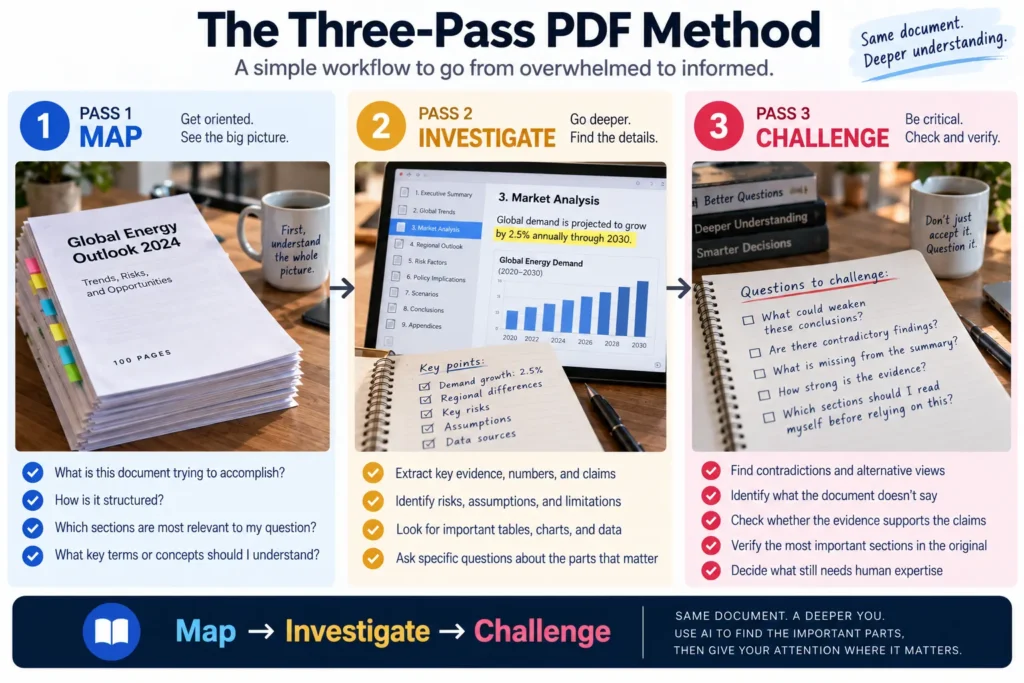
For an important document, I’d use three passes.
Pass 1 — Map
Ask:
- What is this?
- How is it structured?
- Which sections matter for my question?
- What terminology should I understand?
The goal is orientation.
Pass 2 — Investigate
Ask targeted questions.
Extract:
- evidence,
- numbers,
- claims,
- risks,
- assumptions,
- disagreements.
The goal is understanding.
Pass 3 — Challenge
Ask:
- What did we miss?
- What weakens the conclusion?
- Where is the evidence ambiguous?
- Which claims should I verify manually?
The goal is skepticism.
That third pass is what turns a convenient summary into a more serious research workflow.
A Useful Prompt: Separate Fact From Interpretation
Try this:
For each major conclusion, separate:
- what the document explicitly states,
- the evidence supporting it,
- your interpretation,
- any uncertainty or limitation.
This forces an important distinction.
The document said it.
is different from:
The AI inferred it.
Those two things can look remarkably similar in a fluent answer.
They shouldn’t.
Another Useful Prompt: Show Me the Evidence
Instead of:
Why is the company struggling?
ask:
Identify the evidence in the document that suggests the company is struggling. Give me the relevant section or page context for each point, and distinguish direct evidence from inference.
Now you can audit the answer.
That’s the key word:
audit.
For casual reading, convenience may be enough.
For important reading, you want answers you can trace back to the document.
The Trust Ladder
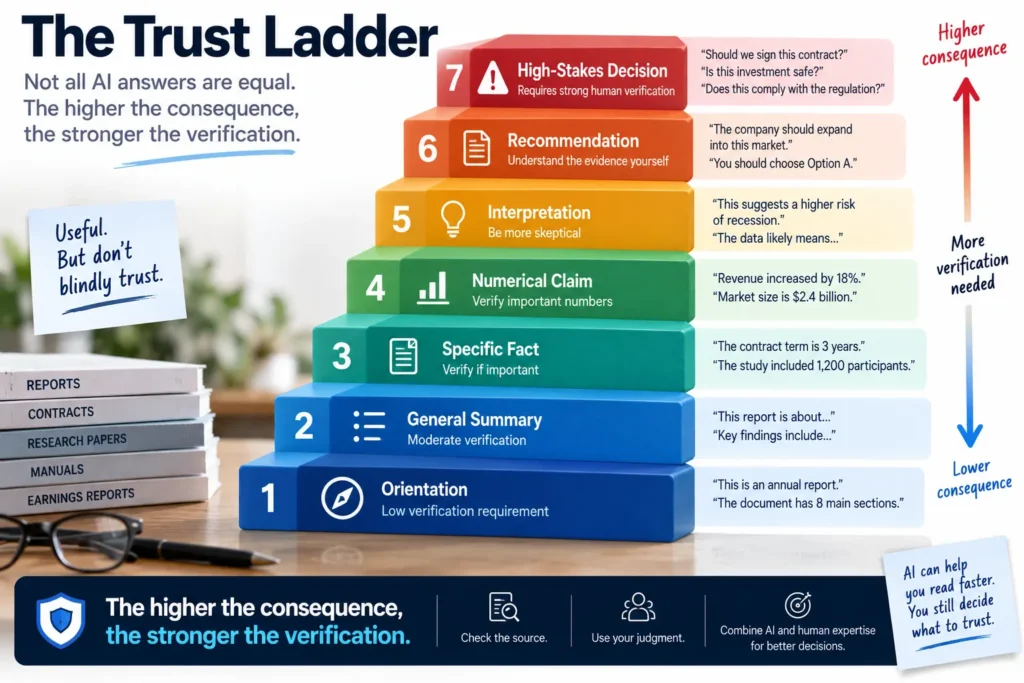
I wouldn’t treat every AI-generated statement from a PDF equally.
I’d think of it like this:
Orientation
→ low verification requirement
General Summary
→ moderate verification
Specific Fact
→ verify if important
Numerical Claim
→ verify
Interpretation
→ challenge
Recommendation
→ understand the evidence yourself
High-Stakes Decision
→ AI should assist, not be the final authority
The higher you climb, the less appropriate blind trust becomes.
AI Doesn’t Need to Replace Reading to Save Hours
This is the part I think gets misunderstood.
Suppose a 100-page report would take you three hours to read carefully.
AI helps you:
- map it in five minutes,
- identify 30 relevant pages,
- extract ten important numbers,
- locate three major risks,
- find two contradictory sections.
You then spend an hour reading the important material yourself.
AI didn’t reduce three hours to three minutes.
It reduced three hours to perhaps one.
That’s less magical.
It’s also much more believable.
And for serious work, much more useful.
The Goal Isn’t Fewer Pages
The goal is better attention.
A 100-page document may contain only ten pages that matter to your decision.
Or the crucial information may be one sentence on page 93.
AI’s greatest advantage isn’t that it can make documents shorter.
It’s that it can help us allocate attention more intelligently.
That’s a very different promise.
And it’s one I trust much more.
Different AI Tools Solve Different PDF Problems
Once you understand that PDF analysis isn’t one task, choosing an AI becomes much easier.
Sometimes you need a conversation.
Sometimes you need to interrogate a long document.
Sometimes you want answers grounded almost entirely in a collection of sources you’ve provided.
Those aren’t identical jobs.
So I wouldn’t ask:
Which AI is best for PDFs?
I’d ask:
What do I need to do with this PDF?
ChatGPT: When the PDF Is Part of a Larger Problem
ChatGPT can be particularly useful when the document is only one piece of the work.
Maybe you upload a report and then want to:
- understand it,
- compare ideas,
- calculate something,
- turn findings into a table,
- brainstorm implications,
- draft questions,
- create a presentation outline,
- continue researching the topic.
The advantage is flexibility.
The PDF doesn’t have to remain the center of the conversation.
You can move from:
What does this report say?
to:
What does this mean for our project?
and then:
Give me three options based on these findings.
That’s useful when reading is part of a broader thinking workflow.
But the same rule still applies:
When an important claim comes from the document, trace it back to the document.
Claude: When the Reading Itself Is the Work
Claude becomes particularly interesting when the central problem is:
I have a lot to read.
Long reports.
Policies.
Academic material.
Drafts.
Multiple documents that need careful comparison.
A useful workflow isn’t simply:
Summarize all of this.
Instead:
Map the arguments across these documents.
Then:
Where do the authors agree?
Then:
Where do they contradict one another?
Then:
Which claims rely on different assumptions?
Now you’re using AI to help perform comparative reading.
That’s much more valuable than producing five summaries and reading those instead.
NotebookLM: When You Want to Stay Close to Your Sources
Sometimes you don’t want a general-purpose AI wandering too far beyond the material.
You have:
- lecture notes,
- research papers,
- company documents,
- reports,
- interview transcripts.
And the question is:
What can I learn from these sources?
That’s the type of workflow where a source-centered environment such as NotebookLM becomes attractive.
For studying, literature reviews, research collections, and defined document sets, keeping the conversation anchored to the provided material can reduce one common problem:
The AI enthusiastically filling gaps with unrelated knowledge.
But source grounding doesn’t eliminate the need to think.
A source can itself be:
- outdated,
- biased,
- incomplete,
- wrong.
Grounded AI can tell you what the sources say.
It cannot automatically make those sources trustworthy.
Don’t Choose the Tool Before You Choose the Task
Here’s the distinction I’d keep.
Need to understand one complex document?
Use a strong document-capable conversational AI.
Need to compare several long documents?
Prioritize long-document analysis and cross-document reasoning.
Need to study a defined source collection?
A source-grounded workspace can be particularly useful.
Need to turn findings into other work?
Choose an environment that lets you continue from analysis into writing, calculations, presentations, or planning.
The best PDF tool isn’t necessarily the one with the longest context window.
It’s the one that fits what happens after the PDF is opened.
Research Papers Need a Different Workflow
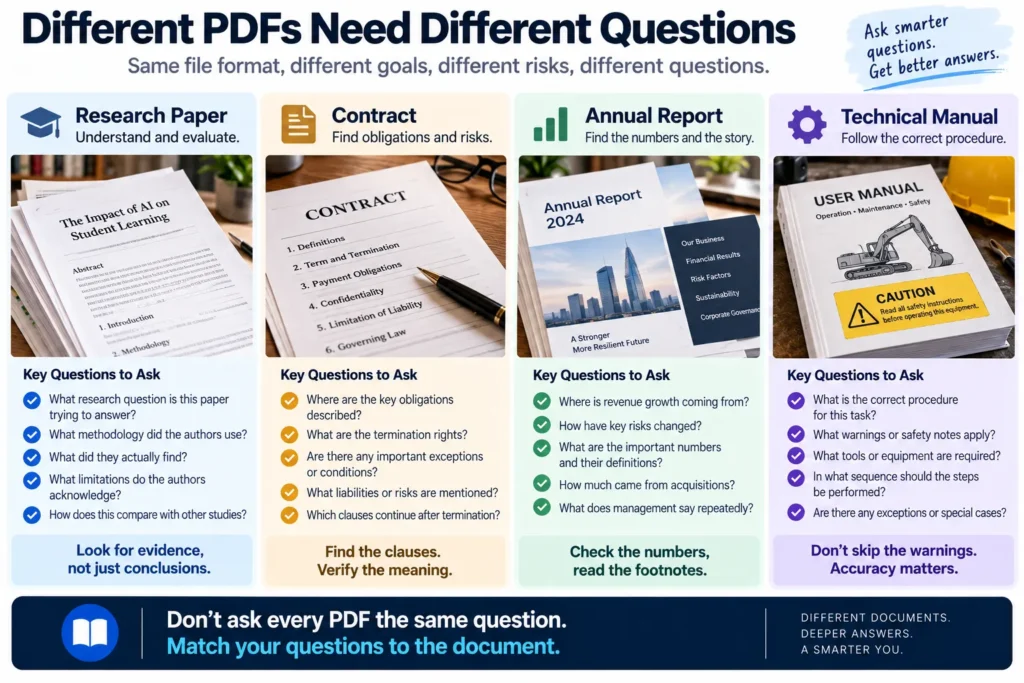
Suppose you’re reading an academic paper.
Don’t begin with:
Summarize this paper.
Try:
What research question is this paper trying to answer?
Then:
What methodology did the authors use?
Then:
What did they actually find?
Then:
What limitations do the authors acknowledge?
Then the question I especially like:
What would this study need to prove before I could make a stronger claim than the authors themselves make?
This helps prevent a common research mistake.
The paper finds an association.
The summary turns it into causation.
The article turns it into certainty.
By the end, the claim is much stronger than the original evidence.
AI can accelerate that distortion if you don’t deliberately stop it.
Contracts Need an Even More Conservative Workflow
Imagine uploading a 70-page contract.
AI can be enormously useful for navigation.
Ask:
Where are termination rights discussed?
Find sections related to liability.
Identify payment obligations.
Where does the contract discuss renewal?
Which clauses appear to impose obligations after termination?
That’s useful.
But I would draw a hard line between:
finding language
and
deciding what the language legally means for you.
Legal interpretation can depend on:
- jurisdiction,
- definitions elsewhere in the contract,
- incorporated documents,
- amendments,
- case law,
- facts not contained in the PDF.
Use AI to navigate.
Use qualified legal advice when the consequence justifies it.
A faster contract search isn’t the same thing as legal certainty.
Annual Reports Are Perfect for Question-First Reading
Annual reports are long partly because they serve many audiences.
You probably don’t need every page.
If I’m evaluating a company, I might begin with questions such as:
Where is revenue growth coming from?
What risks have changed since the previous year?
What debt matures in the next three years?
How much of growth came from acquisitions?
Which business segment is becoming more or less profitable?
What does management say repeatedly?
Then I’d ask AI to locate the relevant sections.
This transforms the annual report from a book into a database of evidence.
But I’d still inspect important:
- tables,
- footnotes,
- accounting definitions,
- management qualifications.
A financial number without its definition can be surprisingly misleading.
Manuals Are About Procedures, Not Summaries
A technical manual creates another problem.
Imagine repairing a machine.
You don’t need:
Here’s what this 300-page manual is generally about.
You need:
What is the correct procedure for replacing this component?
And perhaps more importantly:
Which warnings and prerequisites apply before I begin?
AI summaries can be dangerous if they optimize for brevity and accidentally remove a safety step.
For procedural documents, I’d ask for:
- prerequisites,
- warnings,
- required tools,
- exact sequence,
- exceptions,
- where each step comes from.
Then I’d compare critical instructions with the original manual.
Efficiency should never come from deleting the warning label.
Textbooks Are About Learning, Not Extraction
If you’re studying from a textbook, the goal changes again.
You don’t necessarily want AI to compress the chapter.
You want it to help you understand and remember it.
Ask:
What are the five concepts I need to understand before moving to the next chapter?
Then:
Quiz me on the first concept without giving me the answer.
Then:
Based on my answer, what did I misunderstand?
Then:
Give me a new example that isn’t in the textbook.
Now the PDF becomes material for tutoring.
That’s very different from summarization.
The same principle applies to AI study tools more broadly: the goal should be deeper understanding, not simply faster completion.
Comparing Multiple PDFs Is Where AI Gets Really Useful
Suppose you have five reports on the same market.
Reading five summaries independently is useful.
Building a comparison is better.
Ask AI to create a matrix:
| Question | Report A | Report B | Report C |
|---|---|---|---|
| Market size | |||
| Growth forecast | |||
| Geography | |||
| Key assumptions | |||
| Major risks | |||
| Methodology |
Now differences become visible.
Then ask:
Why do these reports reach different conclusions?
Maybe they’re using:
- different years,
- different market definitions,
- different geographies,
- different methodologies,
- different assumptions.
The disagreement itself may be more informative than any individual forecast.
The Contradiction Pass
When working with multiple documents, I’d always add one dedicated step:
Find contradictions.
Not just:
Compare these.
Ask specifically:
Identify claims that cannot all be true at the same time.
Then:
For each contradiction, show the evidence from both sources and explain what might account for the difference.
This is where AI becomes genuinely useful as a research assistant.
Humans are good at understanding meaning.
Machines are extremely useful for holding many pieces of text in working context and surfacing patterns we might overlook.
Use both strengths.
When I Would Not Trust an AI PDF Summary Alone
There are situations where the summary should be treated only as navigation.
Especially when the document affects:
- medical decisions,
- legal obligations,
- financial transactions,
- safety procedures,
- regulatory compliance,
- employment decisions,
- major investments.
The reason isn’t that AI is uniquely unreliable.
Humans misunderstand documents too.
The issue is consequence.
If getting the answer wrong costs almost nothing, convenience can dominate.
If getting it wrong could materially harm someone, verification should dominate.
The 10-Minute PDF Workflow
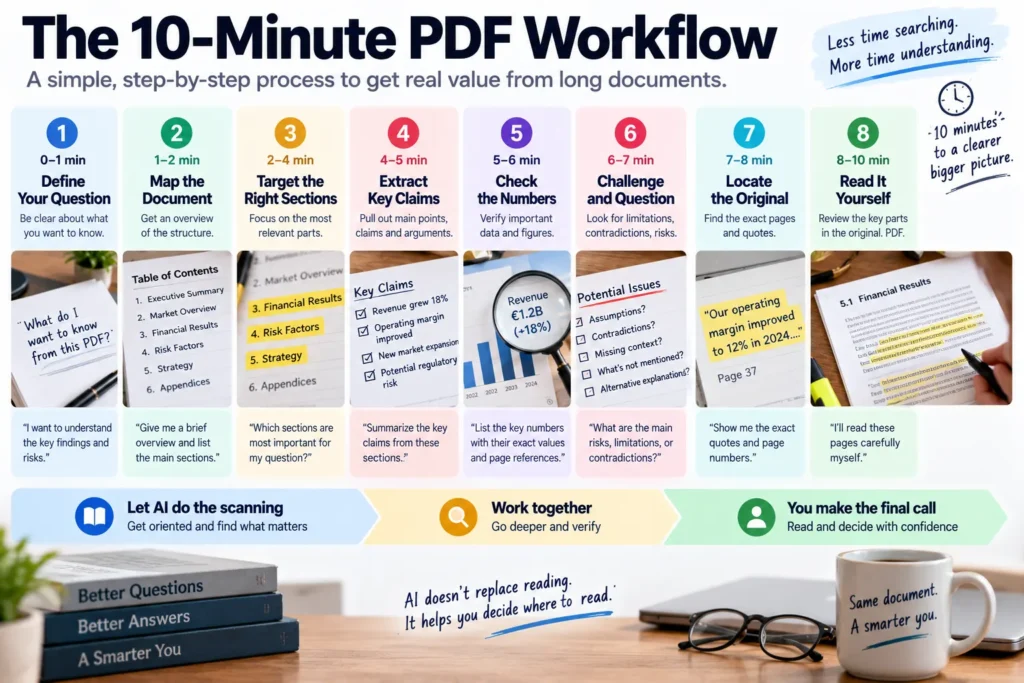
For an ordinary but important document, here’s the workflow I’d actually use.
Minute 0–1: Define the Question
Before uploading anything, write:
What am I trying to learn or decide?
One sentence.
Minute 1–2: Map the Document
Ask for:
- purpose,
- structure,
- relevant sections.
Minute 2–4: Target the Evidence
Ask your specific questions.
Don’t request one giant summary.
Minute 4–5: Extract Key Claims
Ask for the major claims that affect your question.
Minute 5–6: Extract Numbers Separately
Identify the important numbers, units, periods, and definitions.
Minute 6–7: Challenge the Answer
Ask:
What weakens or contradicts this conclusion?
Minute 7–8: Find the Original Sections
Locate the pages or sections containing the critical evidence.
Minute 8–10: Read Them Yourself
This is the part people want to skip.
Don’t.
Ten minutes won’t replace a full expert review.
But for everyday research, this workflow can be dramatically better than either extreme:
reading everything blindly
or
trusting a one-click summary blindly.
My PDF Analysis Checklist
Before I rely on an AI-generated document analysis, I’d ask:
Did I define the question?
Without one, the AI decides what matters.
Do I know which sections support the answer?
Important claims should be traceable.
Did I verify the important numbers?
Especially units, dates, percentages, and definitions.
Did I inspect important tables or charts?
Visual structure can contain meaning a summary loses.
Did I ask for contradictions and limitations?
A conclusion without caveats can become misleading.
Did AI separate source statements from inference?
These should never silently merge.
Is the consequence high enough to require expert review?
If yes, get it.
The Evidence Test
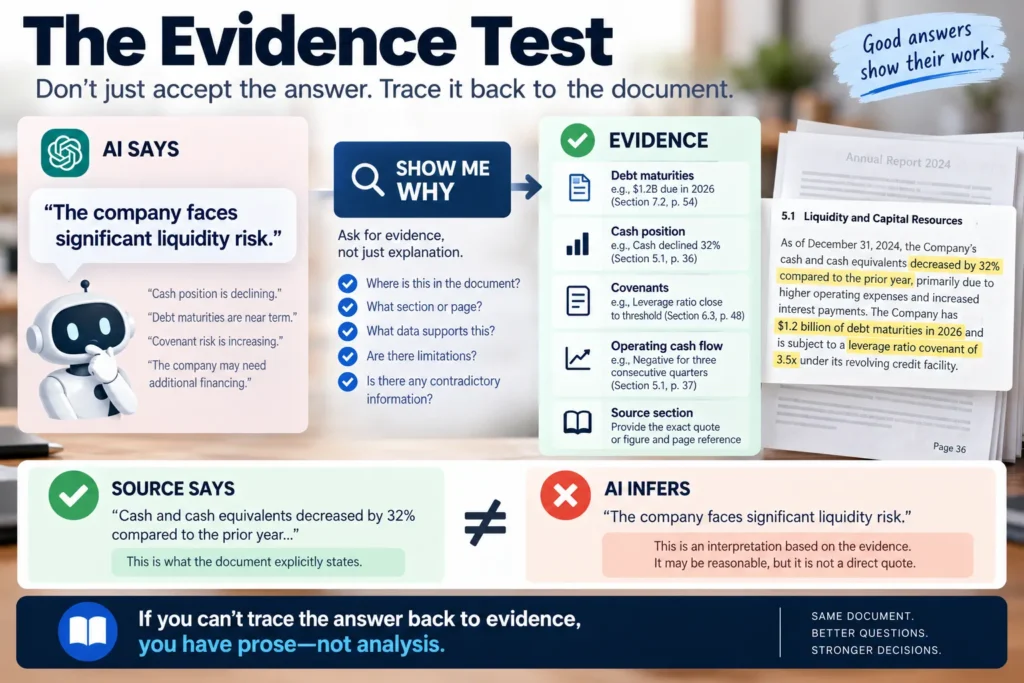
Here’s the simplest test in the entire article.
AI tells you:
The company faces significant liquidity risk.
Ask:
Show me why.
If the answer points to:
- debt maturities,
- declining cash,
- covenant disclosures,
- negative operating cash flow,
you have evidence to inspect.
If it responds with more fluent explanation but no traceable support, you don’t yet have analysis.
You have prose.
That’s an important difference.
The Page Number Problem
There’s one practical issue worth mentioning.
Don’t blindly assume every AI-provided page reference is perfect.
PDFs can contain:
- printed page numbers,
- viewer page numbers,
- cover pages,
- appendices,
- Roman numerals,
- scanned sections.
“Page 42” can therefore mean different things.
When a claim matters, use the quoted heading, surrounding text, table title, or section name to confirm you’ve reached the correct place.
The goal isn’t merely getting a citation.
It’s being able to find the evidence again.
The Best PDF Prompt Isn’t a Prompt
It’s a sequence.
That’s the pattern running through this entire workflow.
Weak:
Summarize this PDF.
Better:
What is this document?
Then:
Where should I look for my question?
Then:
What evidence answers it?
Then:
What contradicts that evidence?
Then:
Which claims should I verify myself?
Then:
Show me where.
This sequence creates something a single giant prompt usually doesn’t:
a research process.
AI Changes Reading More Than It Eliminates Reading
Before AI, reading a long report often meant moving linearly through information.
Page 1.
Page 2.
Page 3.
Now we can interrogate documents.
Jump.
Compare.
Search semantically.
Ask follow-up questions.
Extract structures.
Surface contradictions.
That may change professional reading considerably.
But I don’t think the endpoint is:
Nobody reads anymore.
A more useful endpoint is:
Humans spend more of their reading time on the passages that actually deserve human attention.
That’s a much better bargain.
It’s another example of using AI to reduce mechanical work without outsourcing the judgment that actually matters.
Final Thoughts
So, can AI really read a 100-page PDF for you?
Yes.
But that’s not quite the right promise.
AI can process the document.
Map it.
Summarize it.
Search it.
Compare sections.
Extract claims.
Find numbers.
Surface contradictions.
Help you ask better questions.
That’s extraordinarily useful.
What it cannot do is make the consequences of being wrong disappear.
A fluent summary can still omit the caveat that changes the conclusion.
A correctly extracted number can still be interpreted incorrectly.
A source-grounded answer can still be grounded in a bad source.
A contract clause can still require professional interpretation.
A technical procedure can still carry safety consequences.
So I wouldn’t use AI to avoid reading.
I’d use it to decide what deserves reading.
Let AI scan the hundred pages.
Let it build the map.
Let it find the evidence.
Let it tell you where the disagreement lives.
Then spend your attention where attention is expensive and valuable.
On the footnote.
The limitation.
The strange number.
The contradictory paragraph.
The sentence that changes the decision.
Because the real breakthrough isn’t that AI can read faster than we can.
It’s that, used carefully, AI can help us become much more selective about where we need to read slowly.
Frequently Asked Questions
Can AI summarize a 100-page PDF?
Yes. Modern AI systems can analyze and summarize long PDFs, although practical limits vary by tool, file structure, document length, and the amount of non-text content. For important documents, targeted analysis is generally more useful than relying on one broad summary.
What is the best AI for reading PDFs?
It depends on the task. General-purpose assistants can be useful when PDF analysis is part of a broader workflow, long-document tools can help with extensive reading and comparison, and source-centered tools can be useful when you want answers grounded primarily in a defined collection of documents.
Can I trust AI summaries of PDFs?
Use them as assistance rather than unquestioned authority. Important claims, numbers, tables, caveats, and conclusions should be checked against the original document when accuracy matters.
Can AI compare multiple PDFs?
Yes. One particularly useful workflow is creating a structured comparison across documents and then asking AI to identify disagreements, different assumptions, methodological differences, and contradictory claims.
Is it safe to use AI to review contracts?
AI can help locate clauses, summarize language, and identify areas worth reviewing, but it should not automatically replace qualified legal advice when contractual interpretation has meaningful consequences.
Can AI understand charts and tables inside PDFs?
Many modern multimodal systems can analyze charts and tables, but complex layouts, scanned documents, footnotes, merged cells, axes, and visual relationships can still cause errors. Verify any visual evidence that materially affects your conclusion.
What’s the best prompt for analyzing a PDF?
Instead of relying on one prompt, use a sequence: define your question, map the document, locate relevant evidence, extract claims and numbers, search for contradictions and limitations, and verify the most important sections in the original.